In today’s article I’ll show you a little known trick to give RSLogix 5, 500 & Micro some Halloween spirit!
First, you know that online animation in RSLogix?
You know, the rotating “Ladder” animation near the top of the screen:
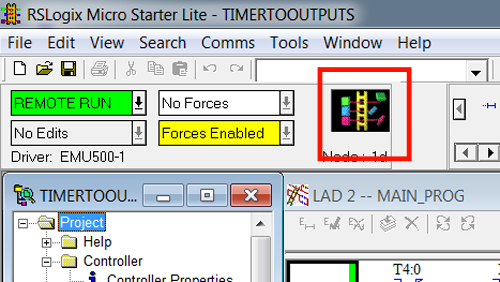
Well we’re going to change that into something a little more in tune with October’s best known holiday.
First thing you need to do (after opening RSLogix) is to hold down your control (CTRL) key.
Next, right click on the “Ladder” graphic to bring up the menu shown below:
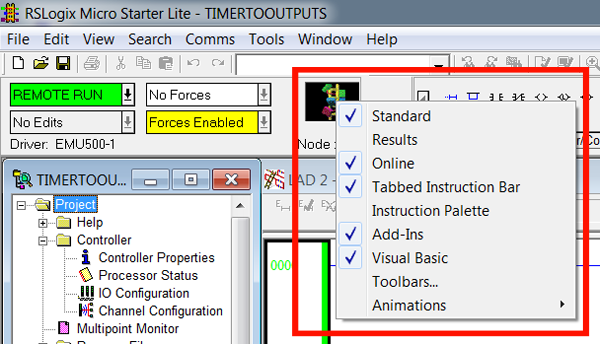
From this menu choose Animations, and then choose Pumpkin:
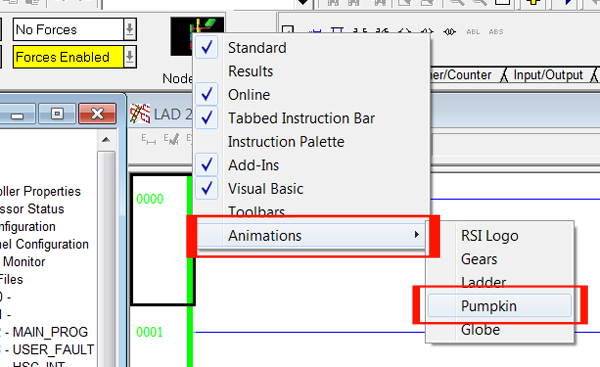
And now your copy of RSLogix is ready for Halloween!
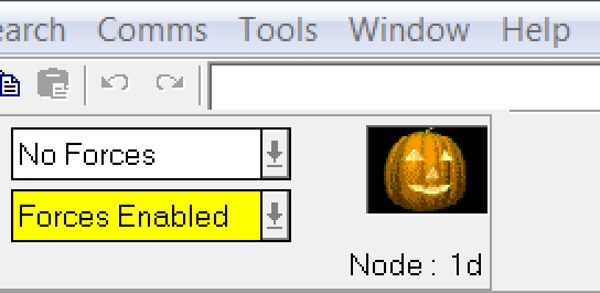 I hope this article about changing the online animation in RSLogix, while having no practical purpose, was a least entertaining!

If you would live to leave your own thoughts or comments, just fill in the “post a comment or question” link below.
Until next time, Peace ✌️
If you enjoyed this content, please give it a Like, and consider Sharing a link to it as that is the best way for us to grow our audience, which in turn allows us to produce more content 🙂
Shawn M Tierney
Technology Enthusiast & Content Creator
Support our work and gain access to hundreds members only articles and videos by becoming a member at The Automation Blog or on YouTube. You’ll also find all of my affordable PLC, HMI, and SCADA courses at TheAutomationSchool.com.

Shawn Tierney is a lifelong Technology Enthusiast who began programing in the early 80's on the Apple II and VIC-20 personal computers. After earning a degree in Electronics, he worked as a Certified Controls and Information Automation Specialist for 25 years before launching The Automation Blog and School in 2013.
Latest posts by Shawn Tierney (see all)
- A.I. Tech Talk with Emil Soerensen of Kapa.ai (12/04/25) - December 4, 2025
- Innovation Summit Las Vegas 2025 Recap (P254) - December 3, 2025
- New Features of Ignition 8.3 with Travis Cox (S2E37) - December 2, 2025