Home Blog Page 5

Commission Siemens VFDs using StartDrive (P240)

Shawn Tierney meets up with Jackie Stokes of Siemens to learn how to commission VFDs using StartDrive in this episode of The Automation Podcast.

For any links related to this episode, check out the “Show Notes” located below the video.


Watch The Automation Podcast from The Automation Blog:


Listen to The Automation Podcast from The Automation Blog:


Read the transcript on The Automation Blog: (automatically generated)

Shawn Tierney (Host): Everybody, thank you for tuning back in. In this episode, I actually meet back up with Jackie Stokes from Siemens to learn how to use a start drive to commission Siemens drive, specifically the g one twenty and the g two twenty. Although, I’m sure some of the other drives are very similar. And this actually came from a request from a viewer who’s who asked that we have somebody on the show us that. And because I’m not the expert, I reached out to Jackie and she agreed to come on.

So I’m looking forward to that. Now we’re gonna cover the g one twenty. The g two twenty, we’re gonna cover how to change Siemens drives to be Ethernet IP instead of PROFINET. They have Ethernet IP built in, which is really cool. And then we’re gonna cover some free training they have coming up.

I will include those links below as well as the links from Jackie below in the description. You should see that on all platforms. And I do wanna reach out to you and ask for a favor. I’m coming up on my ten year anniversary of doing this full time, and I was hoping that you guys could help me out to reach a 100,000 subscribers on YouTube. Now I know a lot of you listen on Apple, a lot listen on Spotify, a lot of you consume the shows over at the automationblog.com, and I appreciate you all.

But I thought, wouldn’t it be great if I could hit a 100,000 subscribers over on YouTube by the end of the year? And maybe if we do, we could have a celebration. We could do a live stream, do some q and a. I’d love to hear what you guys thought over I actually started the channel twelve years ago. I was doing a part time to start, and I’d love to know what your favorite episodes were or what episodes what kind of episodes you like to see in the future.

And so if you guys I know even if you’re on another platform, if you do have a YouTube account, if you could swing by, it’s at insights I a. That’s a lot shorter than insights in automation. So I shortened it up, I think it was a year ago or two years ago. So it’s at insights I a. Again, if you guys are up to it, I’d love to try to hit a 100,000 subscribers by the end of the year to celebrate my tenth year doing this full time.

And with that, let’s go ahead and jump into how to use StarDrive to set up and commission Siemens VFDs like the g one twenty and g two twenty. Jackie, welcome back to the show. I’m so happy to have you back on and here to talk about using, Siemens VFDs inside of TIA portal. Now we’ve talked about your VFDs so many times on the show over the years, and but we’ve never actually, like, put one in TIA portal and tried it out. And I had actually had a a viewer ask about that.

So thank you for agreeing to come back on. And just in case, some of the audience members didn’t watch the previous episodes where you were on, Could you quickly introduce yourself before jumping into our topic for today?

Jackie Stokes (Siemens): Sure. And thanks for having me back on the show. So my name is Jackie Stokes. I am a marketing programs development manager at Siemens. I work in the motion control business unit.

I’ve been in the business for, oh my goodness, I’m getting old, like, fourteen years now. So I but I’ve been with Siemens for about three and a half years. So, yeah, we’ve talked about, our drives family. I think most recently, we talked about the Synamix g two twenty drive with Ivan, one of our product managers. But, yeah, happy to be back and talking about how to integrate our VFDs into portal.

Shawn Tierney (Host): Yeah. And I appreciate that. I mean, you don’t know what you don’t know. And so when we’re going to integrate our first, you know, drive into TIA Portal, it’s kinda like, well, what do we do? And so I wanted to have you on.

I I could have fumbled through it myself, but I’m like, why not just talk to the experts? So let me turn it back to you, and, let’s go ahead and jump in.

Jackie Stokes (Siemens): Yeah. Sure. So, I have just brief slides before we get hands on. I have a demo unit with me, but just wanna cover what we’re talking about. So we’re talking about our general purpose VFD.

It is called SINAMICS g one twenty. So Sinamics is the name of our drive family, and g stands for general purpose. So that’s kind of the decoder ring for Sinamics g one twenty. It does come in a few different flavors. It comes in a modular version version, which we’re using today.

It comes in a compact version, which is g one twenty c, And it also comes in a distributed or on machine version, which is, g one twenty d or a similar drive, g one fifteen d, and that d is for distributed. So the modular version of this drive, comes with a control unit, a power module, as well as an operator interface. So you can kind of see on the pictures to the right, what this looks like. So the control unit can be separated from the power, module, and then the operator interface can be separated from the components as well. So we’re using control unit two forty e Dash two p n dash f, and then we’re using a power module two forty dash two IP 20.

The firmware version, I believe, is the latest. It’s firmware version 4.7 service pack 14 hotfix four. And the software, we are using start drive. StartDrive is our software for commissioning drives, and it’s in TIA Portal. So if you don’t, have a TIA Portal license, to program our PLCs, for instance, StartDrive is free.

So you can download StartDrive and it will open essentially in TIA Portal. It’s just that if you’re using the free version of StartDrive and you don’t have a license for TIA Portal like programming the PLCs, you won’t be able to program a PLC in it, but you will be able to commission your drive. So that’s the little distinction between Start Drive and TIA Portal. There is also a Start Drive Advanced, for advanced features and programming in the drive that you do have to pay for, but, most of what you can do and what we’ll do today, you can do in the free version of StartDrive, and we’ll give you a link to that, how to download StartDrive. And, of course, this is just one way to commission a drive.

You can also commission it with that industrial operator panel, the IOP dash two, which you can see on your screen. We also have a basic version of it, and then we do have a smart access module which generates, a Wi Fi hotspot, and then you can, you know, step away from the drive, connect on your phone. So three different ways to commission that drive. But if you’re a portal user and you’re using a Siemens PLC or maybe you just, you know, want to do this in software, it’s really easy to do as well. So I’m going to give you a brief overview of what we’re doing, so the procedure, and then I’ll jump into the software and show you what we’re doing.

So basically, basic, we’re going to start off with opening TIA Portal, creating a new project, we’ll go online with the drive via accessible devices. This is where we have the opportunity to assign a name and IP address to the drive, and then we will add the drive to the project. So we are going to upload the device as a new station. So once it’s in the project, we’ll go online with the drive. We’re gonna use a commissioning wizard, which is gonna step us through all the parameters and settings that we need to commission the drive.

We’ll do a motor ID and tuning and optimization. And then finally, we’ll just kind of take a look at the parameters and other features that we can see in portal. So with that, I am going to switch screens. So now we are in, my other computer, which we’re gonna use to program the drive. So what we’re gonna do is we’re gonna open TIA portal.

I already have it open, but you can see the icon here. We are gonna use TIA Portal v 20, so this is the latest version of Portal. And this is what it looks like when you open Portal. What you wanna do is create a new project. So I’m just gonna hit create a new project.

We’ll call this g column 20. Okay. So if you’ve never seen TIA Portal before, you have a lot of different options, and it can be slightly overwhelming. So I recommend we go to project view, and that’s a good way to just jump into what we need to see, for our commissioning. So the first thing we wanna do so this is what portal looks like.

A lot of different windows, a lot of things going on. At the end, I’ll talk about some free training we have. If you’re unfamiliar with portal and you want to, just see what it looks like and understand all the windows and buttons and how to be efficient in the tool. But for today, I’m just gonna show you the commissioning. So under online access, I’m just gonna expand this on the left hand side.

So this is our project tree. You can see we don’t have any devices here. You could add a new device if you wanted, but right now, we’ll just look at our online access. So these are all the things that we can access online, our communications. I’m gonna click up here, which is accessible devices.

And up here, this is how we’re gonna find the drive. So on my computer, I am networked to the drive. So I’m connected to an Ethernet switch on the drive itself, and then my computer has two Ethernet ports, and the port I’m looking for is this, gigabit network connection. So this is the one that’s tied to the drive. You may have to adjust these settings on your own PC in order to see the drive.

But, once you have these configured, you know, you can see different options here. You’re gonna hit start search, and as we’re waiting, one thing to keep in mind is you will need to configure your network adapter settings so that you’re on the same subnet mask as this drive. So, just make sure your PC is configured properly. Otherwise, it won’t be able to find the drive. So here we are.

We see this G 120 Drive one. It has this IP address, one nine two point one six eight point zero point one, and you can see the device type here. So, earlier I mentioned that control unit, that CU two forty e, that is the drive we’re connected to. So we’re gonna hit show here. We’re gonna highlight it, and then we’ll hit show.

Shawn Tierney (Host): Now just for the audience who is listening, there is an option there to flash the screen. So like I showed you with the PLCs in previous episodes, you can do that with the drive as well. It has a little checkbox here. So if you had three or four drives side by side, you could make sure you connect it to the right one by flashing the screen. So go ahead.

I’ll turn it back to you, Jackie.

Jackie Stokes (Siemens): Yeah. That’s a that’s a good point. So right. I I have just one demo unit in my room, so I know what I’m connected to, but that is that’s a very good point. You can flash that little LED.

So now you can see we have under online access, under this, gigabit port network connection, we have this g one twenty drive, and this is where we can go to online and diagnostics, and we can make some changes here. So you’ll see, we know we’re online. So this is another key thing when you’re commissioning drives or any devices within or working with devices within TIA Portal is making sure you’re online with the the correct device and and that you are online. And so this turns to orange up here, and you can see, like, online access here. So that’s an indication that you are online with that device.

So we’ll go to functions here, and this is where you can assign a name. So if you wanted, we could call this drive underscore one. And then what you do is just hit assign name. And then, like, let’s say we wanna change the IP address to dot three, and we’ll assign the IP address. So we changed the name, we changed this IP address.

If you double click on update accessible devices, you can see that our drive one drive underscore one name changed and that, the IP address changed. So that’s what we that’s what we’re looking for. So we just made those changes to the drive. Now what we can do, and, actually, once you change the IP address, you might need to cycle power. So I’m gonna cycle power to the drive.

One second. But what we can do in the meantime is we can upload this device as a new station. So what this is going to do is it’s going to put the drive into the project and it’s creating this drive underscore one. And it’s giving us a little bit of a warning, but that’s okay. We’re gonna upload from the device.

Okay. So now we see drive underscore one in our project tree. I’m going to kind of minimize this online access, and we’re gonna look at the drive up here so we don’t get too confused. So here, we wanna make sure we want to go online with the drive so we can make sure you so, you know, once you if you’re following along, you wanna make sure you select this drive, especially if you have lots of other things in your project tree, because you can go online with a lot of different things. So if you have I remember when I was first learning, portal yeah.

If you don’t have the right thing selected and you select go online and you’re going online with something else, that’s not quite right. So make sure you have it selected and then hit go online up here. It’s this little orange connector. And then you’ll see this green check mark. So that indicates that we are online and connected and the drive is happy.

So now we’ll go to the commissioning wizard. So under here, we’ll double click commissioning, and we have a few options here. So you see the commissioning wizard. We see control panel, motor optimization, and this backup and restore. So we’ll start here with the commissioning wizard.

And then, basically, it’s just gonna step us through how we wanna set up this drive. So we have some options here, the application class. So, there’s expert, which means that all the options are available in the wizard. There’s standard drive control, which again is the most common applications. And then we have dynamic drive control.

So these are more advanced applications. So you can kinda read through this. And if you had questions about what I should be using, you can click this little green arrow here at the bottom for online help. So we’ll just click standard drive control, and we’ll hit next. And this is where you have the option.

You need to tell it, are you connected to a PLC? If you are, where that ramp function is. Is it in the PLC, or are you gonna do it in the drive, or is it gonna be a standalone drive, no PLC? So I’ll walk through this scenario with, standard drive no PLC, and then I can also show you what it looks like if you go the PLC route and how that configures. But a lot of the things are are the same.

So you have an IO configuration here. You have some options. I’m gonna choose 12. As you can see at the top here, they’re predefined interconnections of the inputs and outputs. However, you can change them later.

So, choose the one that best fits your application, but, again, keep in mind, you can change it later if, you change your mind or need to change something. We’ll click next. We are using this motor. So I’m just gonna keep this here, this IEC, and then two twenty volt. We do not have a breaking resistor, and we do not have a filter.

Again, this is where you have the option to select a filter if you are using one, and then it’ll give you a few more. I’ll just show you an example. So if we had a a sine wave filter third party, you would have to input these values. But for this application, we’ll choose no filter, and then we’re gonna enter the motor data. So this is where you’re going to need to read your motor nameplate data, and then we’ll input the motor nameplate data here.

So right now we have point nine seven, point one eight and kilowatts, and then 350 RPM, and then we’ll hit next, and then we’ll hit next. This is where, I wouldn’t don’t touch the current limit. I’m not gonna touch the minimum speed or maximum speed. You have the option here to change your ramp up time or ramp down time if you want. So just, for example, we’ll change these values here, and we’ll click next.

You have an option to change the application, so constant loads, speed to dependent load, and then the motor identification. So if you want, inhibited, identifying motor at standstill, or motor data identification. So I’ll click, this option two here, and then it says that the motor data identification will be performed at the next time that the drive is enabled. And then we’ll hit next. And then here, we’ll save the RAM to ROM, so it’ll be saved in the drive.

And then we’ll hit and you can see the summary up here. So, you have the opportunity, like, if you’re reading through this and maybe you mistyped your motor current, you can go back and, change that setting right now if you wanted. So I would recommend that you read through this, make sure it’s all correct, and then hit finish. So now we are saving to the eprom. I’m going let’s see what’s so it says maintenance required in lower component.

So we’re gonna look at diagnostics here. So you can see, sometimes you wanna you know, if this is unhappy, you kinda wanna see what’s going on. So we’ll go to this online and diagnostics here. Diagnostics, general. Okay.

So you can see, you know, we have our name of our drive and the part number, but let’s look at active faults on alarms. Okay. And what it doesn’t like, the motor data identification activated. So it basically, it’s looking for that motor data, and that’s why it’s it’s giving us this little maintenance required. So what we can do is we’ll go back into commissioning.

We’ll go into motor optimization here. And so once you click on it, it’s gonna give you a warning. This motor identification is performed once the drive is enabled. So we’ll click okay. And then what we can do so first, what you can we’ll hit, activate here.

We’ll click accept, and then we’ll switch on. And then our motor ID is done. And you can see here, it has switched from that, kind of wrench icon to this green checkbox icon, which means that we did a good job.

Shawn Tierney (Host): So it went through and, identified the motor. It applied power to the motor, and I couldn’t see what was happening with the motor. Did it turn the motor at all, or did it just supply power to it? Or

Jackie Stokes (Siemens): Yes. So it just supplied power to it. So and you can see here the the following parameters are determined or changed when the motor with with the motor data identification. So this is what it’s looking at. And we did a stationary measurement, so it did not rotate during that measurement.

Shawn Tierney (Host): Okay.

Jackie Stokes (Siemens): And then we can deactivate control. Yes. Okay. And then we can look at the control panel. So this is kinda cool.

This allows you to test the drive in TIA Portal. You know, we didn’t write any PLC programming. We haven’t, you know, since I have this demo unit, it’s wired up for these particular, you know, little switches that I have on it. But Mhmm. Regardless and independent of that, we can actually, you know, kinda jog and turn on the drive and just test it out.

So I’m gonna hit activate master control. And again, it’s gonna give us a warning because the drive can move. So just be aware of what you’re doing. It wants to make sure you’re you’re okay with this. So I’m gonna hit accept.

We can give it a speed set point, so we’ll give it 200 RPM, and then we can give it a forward command. We can tell it to go backwards. We can increase the speed. And, you know, you can jog forward to this momentary push button here. And yeah.

So it says a nice way to to kinda test it out right here. And then we can deactivate the control. And so and then once you’ve done this, you know, you can go to backup and restore. So this will save RAM to RAM. We can save it here.

It’ll save RAM to RAM. One thing that I should have done when I was first starting out, and that is restore to factory settings. So I won’t do this now, but you can you know, if you get in a situation where you do need to restore to factory settings or, you gotta drive from somewhere else and you need to restore it, you can do that within TIA Portal. So we could do that now and then and then redo the commissioning. So occasionally at least in my experience with the demo units, sometimes they come in and you don’t know what someone has done with them.

Sure. So you wanna start with this. But since I’ve been playing around with this demo, for the past few days, I kinda know what’s in it.

Shawn Tierney (Host): Yeah. And that would be important too if you took the if you’re repurposing it from one application to another, you definitely wouldn’t wanna wipe out everything, restore it to the factory defaults before you, before you use it on a new application.

Jackie Stokes (Siemens): Yes. And that is something, that’s something you can do in, that online access area. So once you’re you know, so here, when you first saw that drive before you upload it as a new station, you have that ability. You know, again, it’s in that commissioning menu. It’s it’s mirrored up here too.

Yeah. But you can go there and do that backup and restore. So that’s the best practice, again, if you’re repurposing a drive. But if it’s out of the box, you know, it’s already at factory default. So once your drive is in a good state, you’ve done your commissioning, you’ve saved RAM to ROM.

What you want to do is you want to make sure your drive is selected, which it should be, but we’ll just go offline here. And then what you wanna do, just to be sure so your project should match what was in the drive, but, a good best practice here is to upload from the device. So that means your project will match whatever is in the drive right now. So this is just warning us, this Telegram configuration, but we’ll hit upload from device. And then we will save our project.

So that is, how you make sure your project now matches the drive. And then if you wanted, you could, you know, have another drive that you’re connecting to, and you could then download to that device, but we know the project matches. So that was a good overview of commissioning basic commissioning for Synamix g one twenty. Our newer drives look a little different. The commissioning wizard is different.

So we’re coming out with our next generation of Synamics drives, two drives to look out for. One is our motion drive. So it’s a servo motion. It is the Synamix s two ten, and then we have a new drive, the Synamix g two twenty, who Ivan, our product manager for that product, was on the show about a year ago and talked in-depth about it. But the whole product family sits a little bit higher than the g one twenty in terms of, capabilities and performance.

So it’s not a successor to the g one twenty. It’s it’s a complement to the product portfolio. But I’ll just give you an overview of what that looks like. We can since I don’t have this demo myself, right now, I’m gonna add a new device. So, again, another idea if, let’s say, you wanted to get your project already so that once your drive arrives, you can just simply download to it.

Another way to do this is to add a new device here in your project tree instead of scanning for it, you know, on the network, assuming you’re connected to a physical device. We can just add it here, do all the commissioning, set up all the parameters, and then once you get the physical drive, you can download to that drive. So, as you can see here, on the left hand side, we have controllers, HMI, PC systems, drives. So it’s gonna let you add whatever you want to your project. I have it selected on drives, and we’ll name this, g two twenty.

And then here, you know, we’re just gonna filter down. So you see all of our g drives here. The g two twenty is at the bottom. We’ll do g two twenty PROFINET also means Ethernet IP, and make sure the version, article number, and we’ll hit okay. Ah, so if you listen to Ivan’s overview of the g two twenty, one of the new features is its security.

And when we say security here in this context, we’re talking about user security. So user management and access control, also known as UMAQ or abbreviated UMAQ. So what you have the opportunity to do here is to configure your security settings. If you want, you can also continue with low security settings. But this is what this looks like.

I’ll just kinda walk through what it looks like. So start a new configuration, what it is. So if you’re unfamiliar with user manage management and access control, this is what it tells you you can do with this tool. So you can enable UMac for the project and prompt users to log in in order to work with the project. You can enable UMac for the drive and prompt users to log in in order to work with the drive via the web server and start drive.

So one of the new commissioning options that you have with our next generation of drives is a web server. And, again, I don’t have the drive with me now, so I won’t show you the web server. We’ll just show you TIA Portal, but that’s what it’s referring to when it says this web server. So just be aware if you check these boxes, and then these later steps will go through, you will have to know your username and password or you will not be able to access this drive. So, just remember to save save your passwords, if you do yes.

If you do go down this route. Now, the scenario of I lost my password, I lost my username, I can’t access this drive. How do I get around that? Well, the only way to get around that is you’re going to have to get a u sorry, an SD card and insert that into the drive and it will have just reset. Txt on it, so a reset text file.

Shawn Tierney (Host): Okay.

Jackie Stokes (Siemens): Yes. So there is a way. It’s you’re not totally, you know, in trouble there, but, you will have to reset the whole drive. So there’s no there’s no, secret way of getting around it. So if you do enable that, that is how you would restore your drive or get access to it again, and then you can see here.

So, data encryption, if you wanted, you could do this, Activate user controls incomplete. Ah, okay. So it said it was incomplete because we did not specify a password, so we have to specify a password here. And I think it has some requirements for your password, so you just wanna make sure you remember this one. We’ll hit okay and then next.

It doesn’t like this. I have to click I have read the information above. Yes. Okay. Click next.

Username. So you could allow a guest to enable access to the drive. It’s up to you. Uses the anonymous user, so we’ll hit yes. Allow data exchange via fieldbus.

So is the anonymous user as they is used for fieldbus communication. So again, just want to make sure you understand these settings. The SDI standard panel access, so we’ll allow the drive to be changed via the standard panel without a username and password, web server access, so again going through all the different ways to access this drive and making sure you are okay with how you’re accessing it. Data encryption, next, and then we will hit finish. So it’s pretty in-depth.

Again, you if you don’t want to, you can skip the security settings. You can also go back and reconfigure them too. So if you’re just working on this project, you know, you don’t you can configure it later. So here, similar to that, drive one, which is the g one twenty, we have all of our options here. We’re gonna go to device configuration or yes.

So we’ll look at our device configuration. You can see here, we have our Synamix g two twenty. We have a motor here, which we actually don’t have a motor. So let’s see here. Properties.

Yes. So we just added the drive. We didn’t add a motor. So we can add the motor here. This is where we’re gonna enter our motor data, for whatever motor we have.

So I’m just gonna make up some values. This is what’s on my current demo unit, so point seven. Obviously, you wanna look at your motor nameplate and make sure it matches, and then we’ll go to our guided quick setup. So little different look and feel, compared to what we did with the g one twenty. It’s giving us a warning here, so the device is not specified.

Specify the device first. We can click on this here. So it wants a little bit more information on what drive we’re using.

Shawn Tierney (Host): Yeah. The power. Right?

Jackie Stokes (Siemens): Yes. So, again, since we’re, we cheated well, I wouldn’t say cheated. But with the g one twenty, when you have it, when you’re online with it, you can upload as new station, so it’s detecting what you have. Mhmm. But since we don’t have that, we’re making this up in the project.

It needs to know, the information. So we’re just gonna pick this one here to satisfy the requirement, and now it’s now it’s happy again. So we’ll go back to quick guided startup. Yes. And our warning went away.

I’ll just move this down. Alright. So connection to the PLC. Define connection. Actually, I’m gonna minimize this window here.

Yes. Do you want to connect it? Will it connect to a PLC via Telegram? In this case, we’ll say yes. It won’t be standalone.

It’ll be connected to a PLC. And then do we want the ramp function in the drive, or do we want in the PLC? We’ll say we want it with the drive. And then, you know, if you’re using safety integrated functions via Prophysafe, you can check that box. So we have made our selections here.

Actually, let’s I wanna see green check boxes at the top. Okay. So we’ve made our selection and you can see the green box. So we we have done completed this step. So select the application, we’re gonna select speed control, we’ll go next.

The operating mode, so similar to that g one twenty, it’s asking a standard drive control, dynamic, and you can see how this changes, or selecting other closed loop control modes. So we’ll go back with standard drive control and click next. Here are the limits. So again, that maximum and minimum speed, this ramp up time, we’ll change it to five seconds. Our limits has turned green.

So again, we have an option here, this fieldbus with data switch over. You can delete all these connections if you want, but, this is just how your digital inputs are, digital inputs, digital outputs, analog inputs, and analog outputs are connected. So you have the option if you wanna get rid of them, or if you want to to keep them and modify them. So we’ll just keep them, and we’ll hit next.

Shawn Tierney (Host): Graphical mapping there of each digital and each IO point to the actual value in the drive, where the previous drive, we had a bunch of items to choose from. We chose 12, which was the standard, you know, your standard inputs and outputs and analog values. But here, it’s very graphical. I like this. This looks really cool, and it looks like it almost looks like I can go in, like, the where it says no connection.

D I four. Right? No connection. It looks like you could choose, like, a yeah. Look at that list.

A whole list of parameters that you could choose to put in that spot.

Jackie Stokes (Siemens): Yes. Exactly. You can get to this setting in the g one twenty. It’s just not part of the commissioning.

Shawn Tierney (Host): So Okay.

Jackie Stokes (Siemens): So but that’s a that’s a good point. So in here, in the, you know, in this newest generation of drives, the commissioning, you have the option to set this up here. But, yeah, it you’re right. You can do it in the g one twenty, but it it doesn’t prompt you right from the get go.

Shawn Tierney (Host): Okay.

Jackie Stokes (Siemens): I’m gonna go back to application setting because I just wanna make sure I you can show more data. Let’s see. Okay. Now that looks good. Next.

Telegram. Here we go. So since we’re talking to a PLC, it wants to know which Telegram we’re gonna use. So the Telegram is basically that exchange of data between PLC and drive. It comes from, like, the PROFI drive, profile.

So it’s kind of a a PROFINET thing term, I guess, I should say. So you want to know what I’m trying to say is you wanna know what each of these telegrams mean in terms of status and control words and the information being exchanged between PLC and drive. So we usually use well, I shouldn’t say usually, but we use, like, Siemens Telegram three fifty two, for basic, like, speed control. But you can choose any of these telegrams, and I would encourage you, if you’re not familiar with telegrams, to, you know, look at the table, see what what kind of data is being exchanged between the drive and PLC, so that you’re selecting the correct one. And you can change this later if you want.

So so, you know, so if, if you make the wrong selection here, you can go back and change it.

Shawn Tierney (Host): Now it looks like it wants us to update the, IO configuration now because we changed the Telegram, which would make sense.

Jackie Stokes (Siemens): Ah, yes. And, I’ll go back to that for a second. So if you go to this PZD interconnections and this and so this is, process data. That’s what the PZD kinda stands for. If we click on that, you can see here what, the Telegram configuration looks like.

So you can see, you know, the alarm code, the fault code, current torque speed, and the control. And then that’s in the receive direction. So that’s just what it looks like here. K. And you’re right.

So if we go IO configuration Yes. So you’re right. Since we are using Telegram three fifty two, we are not having these IO connections connected to parameters within the drive. Next. We’ll be prompted for this rotate and optimize.

So again, we have this option, identify motor data, optimize PDs controller, identify motor data at standstill. So we’ll just keep that and hit next. And at the end here is our summary. So these are all the changes we made, similar to g one twenty. You can go through, make sure you set everything correctly, and then you would perform a download, except we, don’t have our drive yet.

So you can’t quite do that right now. But what you can do, is you can save this. So you can save your project, and then once you get your drive, you can, go online with it and download to that drive.

Shawn Tierney (Host): Excellent. I mean, it’s interesting to see the difference between the, the original one we looked at, the g one twenty, and then this model, the g two twenty, and to see how the the wizard changed over time. And it’s it’s just very interesting. This one seems to be more like like, it’s offering you more details upfront. And, but it’s good to know both because you may have a one twenty or a two twenty or some other drive, so understanding the different interfaces is very helpful.

Jackie Stokes (Siemens): Yes. So now what I wanna show so right now we have this drive configured, to run with a PLC. We’ve have it configured for Telegram three fifty two. And then what we can also do so, like, say we’re in a scenario. Right now it’s configured all the drives are configured, for PROFINET out of the box this G120 and this G220.

But let’s say we have a scenario where we need to configure it for ethernet IP. So maybe we’re using a non Siemens controller. How would you do that? So it’s a little different in the g two twenty compared to the g one twenty. So I just want to make, you know, our viewers aware of these differences.

So what we wanna do in the g two twenty is we wanna go to this drive here. We’re going to hit properties. So we’re gonna pull up this window, so that we can see it while close out that commissioning window. So now we’re in the properties of this. And what we want to do is go to protection and security here.

Shawn Tierney (Host): Mhmm.

Jackie Stokes (Siemens): And ports and protocols, and this is the fieldbus and related protocol configuration. So this is where we can switch to Ethernet IP or Modbus TCP. We’re gonna switch to Ethernet IP, and then we’ll hit okay. And that’s all we had to do. So again here, you could right click.

I think you can yeah. Right click and hit properties here, and then that would is how you find it.

Shawn Tierney (Host): Nice. That was easy.

Jackie Stokes (Siemens): Yes. Now what’s different is in the g one twenty, so we’ll go up here. It’s actually just a parameter in the g one twenty. Oh. So this is a little different.

So what I do usually is I go to parameter view, and then I go to display extended parameters. So this shows all the parameters. And I’m gonna hit control f, so I’m gonna find it. And it’s parameter twenty thirty for field bus. Let’s go find it.

And you can see here, you know, since we made this a standalone drive, it has no protocol, and this is where you can change it from PROFINET or Ethernet IP.

Shawn Tierney (Host): Nice.

Jackie Stokes (Siemens): So the big difference here is, like the g one twenty, the s one twenty, these all have a parameter, parameter twenty thirty, and you just change one parameter and it switches between Ethernet and PROFINET. In the newer drives, you have to go into the device properties, ports and protocols, and make that change if you wanna make it.

Shawn Tierney (Host): That’s good to know. It’s, I don’t think I woulda guessed that.

Jackie Stokes (Siemens): It was something we learned when we got our new demos. So is there anything else?

Shawn Tierney (Host): I think that’s enough to get anybody started. I mean, it’s always good. If you have to sit down with a new VFD, it’s always good to have somebody kinda walk through it first, and then that gives you the confidence to get in there. You know you could get something working. And I I don’t think you’ll ever get through one of these commissionings without having to crack the book.

You’ll definitely wanna read any literature that comes with the VFD. There’s safety stuff in there you gotta know about, because you’re gonna follow NEC and all those other applicable, codes, but, and all, you know, safety safety codes as well. But, you know, I think, you know, just having somebody it’s one thing to read a book. It’s another thing to see actually somebody walk through it. And I know I feel a lot more confident, that I’m, you know, now going and trying something out than I would have before you came on and showed us how to do this.

So I really appreciate you, Jackie, the time. And I don’t know. Was there anything else you want to show?

Jackie Stokes (Siemens): Yes. I do wanna show, some resources we have, to get you guys started and, you know, help you on your journey to commissioning cinematics drives in TIA Portal. So if you are new to, TIA Portal, Synamics drives, just integrating maybe a PLC into TIA Portal, integrating a drive into TIA Portal, we have a really cool tool. So, or I should say a really cool class. So it’s TIA University.

So they’re free expert led workshops, and self study courses. So there are some basic video series. Again, most of this is for, you know, PLC, TIA Portal. However, they do incorporate how to integrate a Dynamics drive into this. So if you’ve never opened up TIA Portal or if it’s been a while, I recommend you do this TIA Test Drive class.

So it happens every month. It’s a full day. It is virtual instructor led, so you’ll be able to remote into a TIA portal project and follow along with the instructor. So you will get to be hands on, but you can do it from your office, from home, from wherever. Again, it’s a day long class.

You can download the syllabus here and take a look. So that’s the TIA test drive. Gives you a really nice overview of TIA Portal and all the things you can do with it. We also have another class called Merge Logics with TIA Portal. So if you’re a Rockwell user, familiar with Studio 5,000, Logix Designer, and you have a a TIA portal project or a Siemens project coming up and you’re like, oh, I’m not quite sure, how to do that.

This gives you context of TIA or this presents TIA portal in the context of what you’re used to in Logix. So if you’re familiar with Logix, the instructor, kind of translates that into TIA Portal for you. So if you’re used to one thing, this is what it looks like in TIA Portal. So again, if you’re, you know, familiar with, Studio 5,000, this will give you a really nice overview. Similar to that TIA test drive class, it’s offered every month.

It’s a day long class. It’s hands on but virtual. So, again, we use a hypervisor. You’ll be able to remote into a virtual machine and, get hands on with the software. So I encourage you guys to, join one of those classes or both.

And then I also want to I’ll give you these links, or rather Shawn will in the video. So this just kind of covers, all things, Dynamics drives. I’ll link to our website, overview of our VFDs and our high performance and servo drives, distributor DC drives, digital drive train, and then our tools and resources. So we have our Siemens product configurator, sizer, TIA selection tool, SINAMICS selector mobile app, drive connections or drive applications. Here I’ve added this Ethernet IP connectivity.

So if you are using SINAMICS drives on Ethernet IP, this will give you all the resources you need to set that up, one, in the drive and then, two, we have add on instructions, EDS files, things like that to make your life easier. And then of course TIA Portal, Dynamic Start Drive, this is what this looks like. So if you do not have Start Drive yet you can download the latest version here And again, that, start drive is within TIA Portal and it’s free, so feel free to download it. And with that, Shawn, it’s been so great to show you all about, TA portal and commissioning, so dynamics drives in it. So feel free to reach out to me again.

Shawn Tierney (Host): Jackie, thank you so much for, taking time out of your busy schedule to do this for us. I know, you know, a, an audience member, you know, asked to, us to kinda cover that, and I’m like, you know, and I’m like, I’ll get Jackie back on the show. So thank you for coming on and showing us star drive and how you know, even though it’s integrated in the TI portal, that component allows us to commission our VFDs, you know, upload from download to them, change parameters, you know, identify the motor, and just everything you walked us through was very helpful. And I’m hoping the audience guys, let me know in the comments. Did you think that was helpful?

And, do you have any follow-up questions? I think we covered so much territory. I don’t have any questions right now, but I would be, I would be interested in knowing what the audience thinks. And, again, Jackie, thank you so much for your time and for showing us how to use stock drive.

Jackie Stokes (Siemens): Thank you, Shawn.

Shawn Tierney (Host): Well, I hope you guys enjoyed that episode. I wanna thank Jackie for coming on and teaching us how to use stock drive. I’ve never used it before, so I really appreciate you’re coming on. And if there’s other things you guys wanna see, let me know. I’m have no problem reaching out to the vendors.

Sometimes, like, great vendors like Siemens and Rockwell and Schneider and other great vendors, they come on and they’ll they’ll offer it. Sometimes I get crickets, but that’s okay. You don’t know until you try. So if there’s anything else you’d like to see, let me know. And if you do have a YouTube account, maybe you’re watching this on YouTube or you’re listening on Apple or Spotify or at the automationblog.com, please consider giving me a sub over on YouTube.

I really would like to try to hit a 100,000 subscribers before the end of the year. It’s kind of a stretch goal, but, you know, this is my tenth year doing this full time, twelfth year since I’ve created the, created the blog and the YouTube site. And I’d really like to see if we couldn’t hit that. I don’t ask a lot. I you know, I’m not one of those people who like to ask for subs and likes and whatnot.

I know you have to do it, but in any case, if you guys don’t mind, I’d love to try to hit that number. So if you can help, that would be awesome. In any case, with all that said, I wanna wish you good health and happiness. And until next time, my friends, peace.


The Automation Podcast, Episode 240 Show Notes:

Special thanks to Jackie for coming back on the show, and to Siemens for sponsoring this episode so we could release it Ad Free! Below you’ll find the timestamps Shawn mentioned in the intro, and helpful links  Jackie provided:

Timestamps

  • G120: 9:39, 14:59

  • G220: 28:09

  • Ethernet/IP: 43:41

  • Free Training: 47:59

Siemens VFD Links:

Until next time, Peace ✌️ 

If you enjoyed this content, please give it a Like, and consider Sharing a link to it as that is the best way for us to grow our audience, which in turn allows us to produce more content 🙂

Shawn M Tierney
Technology Enthusiast & Content Creator

Support our work and gain access to hundreds members only articles and videos by becoming a member at The Automation Blog or on YouTube. You’ll also find all of my affordable PLC, HMI, and SCADA courses at TheAutomationSchool.com.

Shawn Tierney

(no views)

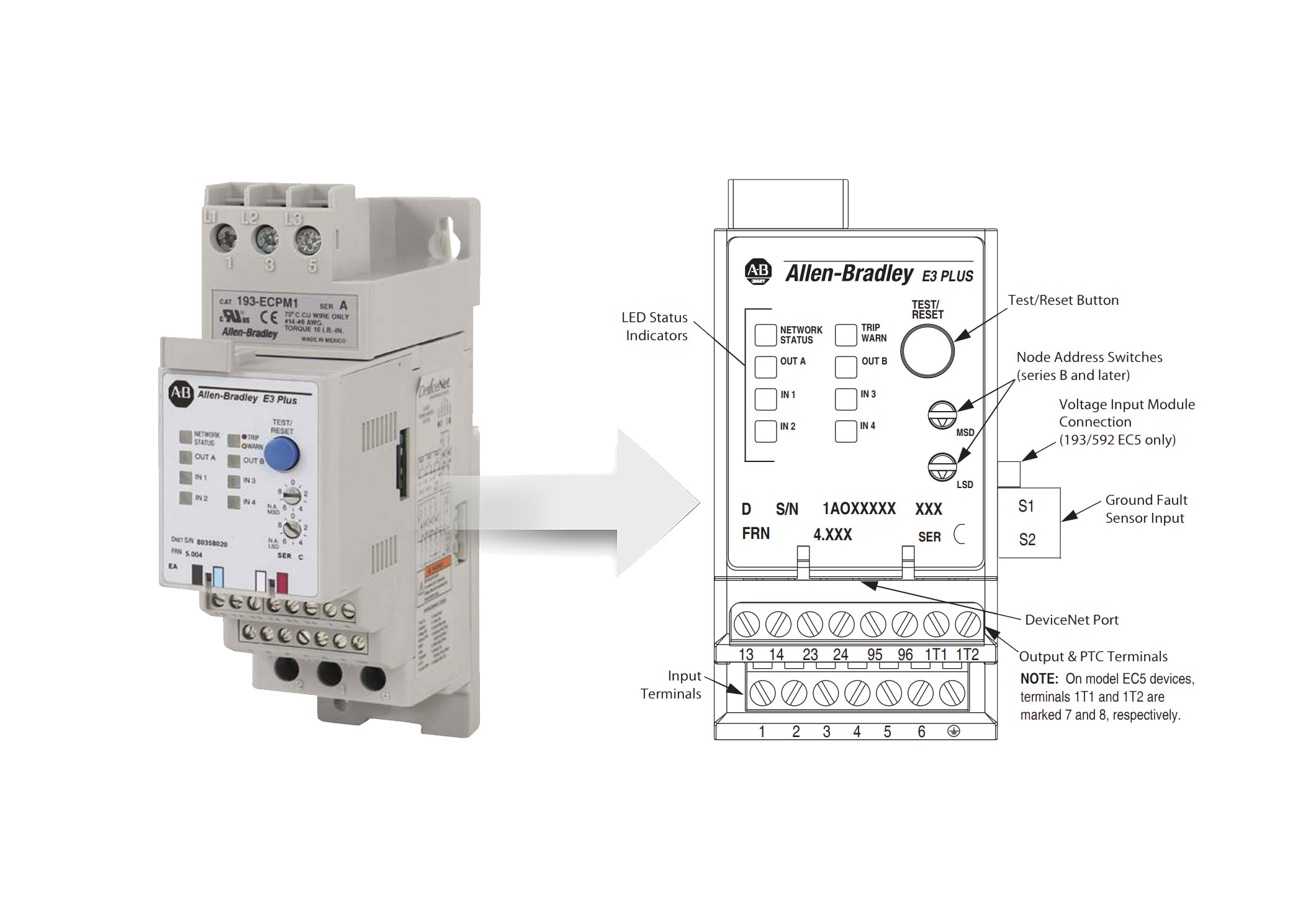
Emulating an Allen-Bradley E3 or E3 Plus


There are times when equipment runs until the day it can be decommissioned and shut down peacefully, removed from service and replaced with an entirely new system in an orderly manner.

There are also times when you have to do whatever you have to do to get by until a more permanent solution can be implemented. If you are still maintaining DeviceNet motor control centers, this tip could be of use to you.

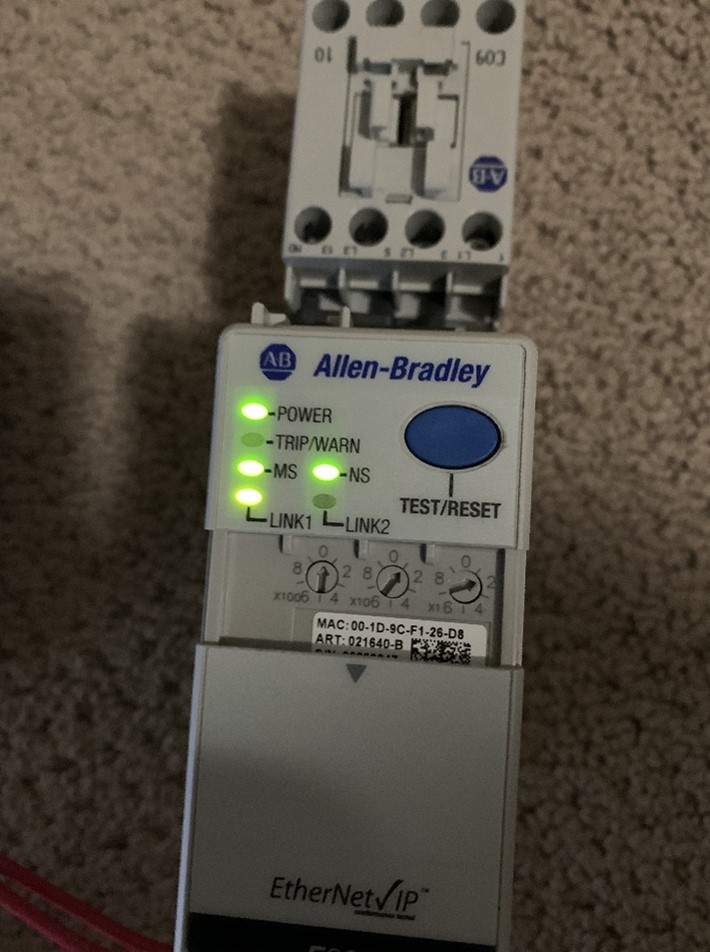
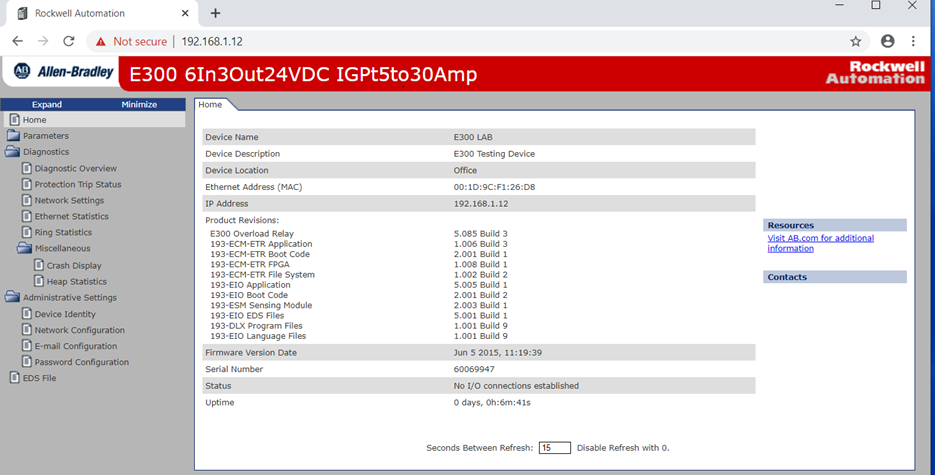
Lets say that you have a motor control center full of Allen Bradly E3 modules and begin to have failures. One solution is to replace the E3 or E3+ module with the DeviceNet E300 module and then run the E300 DeviceNet module in E3 Simulation Mode.

Reading through the knowledge article, it isn’t something you will easily do in the middle of the night as many pieces of the puzzle from software revision to firmware revisions have to be at a certain level to get it all working correctly.

This is something you would have to prepare for. If you have all the software and firmware revisions up to date for your system, then during failures, you could replace the E3(+) modules with the E300 DeviceNet modules and keep your DeviceNet motor control center functioning for some time.

Image by: Brandon Cooper

Prerequisites for setting up your E300 DeviceNet module to replace an E3 or E3 Plus:

  • Update RSNetworx for DeviceNet to version 28.
  • Update your Rockwell Automation DeviceNet scanner to the latest firmware. The instructions in the knowledge article were tested with a 1756-DNB series B DeviceNet scanner running version 7.003 firmware.
  • Install a 193-ECM-DNT DeviceNet Communications Module rev 1.003 or higher for the E300 Overload Relay
  • Install a 193-EIO-XXX Series B Control Module (revision 7.008 or later) for the E300 Overload Relay
  • Install a 193/592-ESM-XX sensing module with firmware revision of 2.003 or higher.
  • Install Emulation Mode EDS Files version 6.02 or higher. Verify E300 is in default mode. Parameter 195 should be NetOverload or Mode 2.
  • If the DL over the E300 is green in the graphic mode, right click on device and select Logic Enable off to make the DL red.
  • Determine which Emulation Mode to use. Refer to the E3 to E300 Migration Product Profile
  • Verify you have met the proper I/O required for the E3 plus device you are replacing.
  • Verify the E300 193-ESM-XXX or 592-ESM-XXX sensing module is in the range of the E3/ E3 Plus device you want to emulate.

Steps: (for a complete list, reference the below referenced knowledge article from Rockwell.)

  1. Open RSNetworx for DeviceNet with the appropriate saved network configuration.
  2. Go online and browse the network. Make note of the next available node address.
  3. Set the node address on the replacement E300 to the next available node address, the one you noted above.
  4. Power down the E3 Plus that you want to replace. Physically remove the E3 Plus.
  5. Physically Install the E300 in place of the E3 Plus you just removed. Power up the E300.
  6. In RSNetworx re-browse the network. You can do this by going offline and back online. You should observe that the E3 Plus you physically removed will have a red “minus” icon on it, indicating that it cannot be seen on the network. You should also observe that the E300 you physically installed shows up at the address you set it to in step #3.
  7. Double click the E300 and select the Parameters tab. You will have the choice to upload or download, select upload. When the upload is complete, navigate to parameter 300.
  8. Set parameter 300 to emulate the E3 Plus that you are replacing. For example: The E3 Plus was a 3-15 Amp model so you will select the E3 Plus (3-15A) from the dropdown menu. NOTE: Make sure that the E300 sensing module (the bottom module in the stack) you are using for a replacement has an amperage range that includes the E3 Plus you are replacing. If you enter an incompatible E3 Plus you will get an “object state conflict” error in RSNetWorx for DeviceNet. Click Apply then click your way through the various dialog boxes that pop up. Click OK to close dialog box.
  9. Delete the E300 node that you were just working with. You can do this by single clicking it and pushing the delete key on your keyboard. Click Save.
  10. Re-browse the network. The node that showed your E300 should now show up as an E3 Plus. After it shows up, delete it again. Click Save. You now have an E300 running as an emulated E3 Plus.
  11. Physically power down the emulated E3 Plus. Change the node on the emulated E3 Plus to the node of the E3 Plus you are replacing. Power up the emulated E3 Plus.
  12. You should still be online in RSNetworx, if not, go online and re-browse the network. In RSNetworx double click the Scanner node and select the Scanlist tab. If prompted, select upload. In the Scanlist, highlight the node of the E3 Plus you are replacing. Directly below the scanlist is a checkbox for “Node Active” deselect this checkbox. Click Apply and then click your way through the dialog boxes. Click OK to close the dialog box. Click Save.
  13. Re-browse the network. You should observe the node for the E3 Plus you are replacing show up with a blue “not equal” icon, this means there is a mismatch. Double click the node and solve the mismatch by clicking your way through the dialog boxes. The node dialog box will open, proceed to the next step.
  14. Select the Parameters tab. When prompted download the parameters to the node. Click your way through the dialog boxes. Click Apply. Click OK to close the dialog box. (This step is where you are pushing the saved parameters from the E3 Plus that you are replacing into the emulated E3 Plus.)
  15. Double click the scanner module and select the Scanlist tab. Highlight the node for the E3 Plus you have been working on. Reselect the “Node Active” checkbox. Click Apply and then click your way through the dialog boxes. Click OK to close the dialog box.
  16. Click Save. Check the parameters on the node you were working with. Make a fresh backup.
Image by: Brandon Cooper

References:

Rockwell Tech Support Article ID: QA45907 | Access Levels: Everyone
E300 Emulation Mode Requirements and Setup for E3 Plus Relay on DeviceNet

Conclusion:

We run across nuances and features all the time that are good to know in case it helps you overcome a potentially catastrophic event such as a power surge that damages an entire motor control center and you can’t get your hands on enough E3’s anymore.

I was recently made aware of this feature or capability and decided to make note of it in case it helps me in the future and I wanted to share it with you as well.


Written by Brandon Cooper
Senior Controls Engineer and Freelance Writer

Have a question? Join our community of pros to take part in the discussion! You'll also find all of our automation courses at TheAutomationSchool.com.

Sponsor and Advertise: Get your product or service in front of our 75K followers while also supporting independent automation journalism by sponsoring or advertising with us! Learn more in our Media Guide here, or contact us using this form.

Shawn Tierney
 

Top ControlLogix Reviews (and new review system)

In this week’s video series, Shawn shares the top ControlLogix reviews at TheAutomationSchool.com, and also details the new course review system and special course discounts for new and returning students.

Note: For all the links mentioned in the below videos, check out the “Show Notes” section below.

#ControlLogix #PACBasics #TheAutomationSchool


Review 1: Vast Knowledge of ControlLogix System


Review 2: Lots of information gleaned from years in the field


Review 3: Interesting Course, Knowledgeable Instructor


Review 4: Step-by-step approach, and attention to details


Review 5: Great Stuff! Detailed Course. Good Teacher


Review 6: Informative and helpful – a great course!


Show Notes:

Links mentioned in the above videos:


Until next time, Peace ✌️ 

If you enjoyed this content, please give it a Like, and consider Sharing a link to it as that is the best way for us to grow our audience, which in turn allows us to produce more content 🙂

Shawn M Tierney
Technology Enthusiast & Content Creator

Support our work and gain access to hundreds members only articles and videos by becoming a member at The Automation Blog or on YouTube. You’ll also find all of my affordable PLC, HMI, and SCADA courses at TheAutomationSchool.com.

Shawn Tierney

(no views)

Trends in Robotics with Winston Leung of QNX (P239)

Shawn Tierney meets up with Winston Leung of QNX to discuss Trends in Robotics in this episode of The Automation Podcast.

For any links related to this episode, check out the “Show Notes” located below the video.


Watch The Automation Podcast from The Automation Blog:


Note: As mentioned above, this episode was not sponsored so the video edition is a “member only” perk. The below audio edition (also available on major podcasting platforms) is available to the public and supported by ads. To learn more about our membership/supporter options and benefits, click here.


Listen to The Automation Podcast from The Automation Blog:


The Automation Podcast, Episode 239 Show Notes:

To learn about becoming a member and unlocking hundreds of our “member’s only” videos, click here.

Until next time, Peace ✌️ 

If you enjoyed this content, please give it a Like, and consider Sharing a link to it as that is the best way for us to grow our audience, which in turn allows us to produce more content 🙂

Shawn M Tierney
Technology Enthusiast & Content Creator

Support our work and gain access to hundreds members only articles and videos by becoming a member at The Automation Blog or on YouTube. You’ll also find all of my affordable PLC, HMI, and SCADA courses at TheAutomationSchool.com.

Shawn Tierney

(no views)

First Look: MOXA Smart Switches (TIA Portal & Studio 5000 Integration) (S2E14)

This week Shawn unboxes and integrates MOXA SDS-G3000 Smart Switches into a TIA Portal Project using PROFINET (starts at 14:28,) and a Studio 5000 Project using Ethernet/IP (starts at 24:06,) in episode 14 of The Automation Show Season 2:

#Automation #IndustrialAutomation #InsightsInAutomation


Watch The Automation Show: MOXA Smart Switches


Show Notes:

Thanks to MOXA for sending in the two SDS-G3000 Switches, and for sponsoring this episode so it would be ad free! For more information about MOXA Smart Switches, see the below links:


Vendors: Would you like your product featured on the Show, Podcast, and Blog? If you would, please contact me at: https://theautomationblog.com/contact

Until next time, Peace ✌️ 

If you enjoyed this content, please give it a Like, and consider Sharing a link to it as that is the best way for us to grow our audience, which in turn allows us to produce more content 🙂

Shawn M Tierney
Technology Enthusiast & Content Creator

Support our work and gain access to hundreds members only articles and videos by becoming a member at The Automation Blog or on YouTube. You’ll also find all of my affordable PLC, HMI, and SCADA courses at TheAutomationSchool.com.

Shawn Tierney

(no views)

The Automation Museum Launch, June 06, 2025: PLC-5

Shawn Tierney shares information about the new Automation Museum fundraiser, as well as his thoughts on A-B PLC-5s, and why they would make a good exhibit.

For information about donating to the Automation Museum, please click here.


Listen to Automation Tech Talk on The Automation Blog:


Read the transcript on The Automation Blog: (automatically generated)

Shawn Tierney (Host): Hey, everybody. Shawn Tierney here, and I’m announcing a fundraiser for something I’ve been wanting to do for a long time, the automation museum. And I thought this would be a great place where we could feature the history of industrial automation. And, of course, they’ll have other parts too. There’ll be other technologies covered to this like computers.

You wanna cover computers as well. But, in any case, for you and I, the biggest thing would be automation, I think. And the whole thought process behind this came when, you know, I’m collecting, all this equipment, do training courses, and I’ve been doing this for thirty five years. And I some old things are just, you know, sentimental to me and I don’t wanna throw them away. And I know there’s a lot of you out there who are in the same boat.

A matter of fact, you’ve sent me some great stuff because we’ve talked about my desire to open up an automation museum. And so I’m hoping if we can get just 3% of you out there who follow me to, just to give a few dollars, we could actually get the nonprofit organization set up and start accepting really big donations from large corporations. Now that’s not to say I don’t think that all of us, together, you know, the 80,000, controls engineers in The US couldn’t do this. We could, but it’s a lot easier when you have a five zero one three c and you can get money because a lot of these big companies, they have a edict that they have to give away so much money every year. Right?

They have all these great profits, so they have to give some away. And so we wanna be able to tap into that some too. So, you know, let’s think of this future automation museum. Maybe there’s a Rockwell wing, and Rockwell sponsors some new displays there or a Siemens wing or a Schneider wing or whoever. Right?

I mentioned those three guys first because they’re some of my biggest sponsors. Right? But we could also have a Moxa and a P and F and all the other great vendors who’ve, met with Toledo who sponsored content here. I should probably name them all, but there’s so many of them. Right?

But in any case, I think it’d be very cool to have a place where not only the stuff gets displayed, but you and I can share our knowledge with the rest of the industry. So, you know, when I retire maybe in ten or twenty years, I hope, maybe, you know, who who’s gonna like, if somebody has to go work on a PLC five or a SIC 500 or a Micrologix, where are they gonna find that information? Maybe they’re gonna work on a PLC two. Maybe they’ll work on a PDQ or an s one or s two or some of the really old emoticon 84. Right?

So, how are they gonna get, that information. Right? And how are they gonna learn how to use it and maintain it? And then how are new controls engineers gonna understand where the industry started? Why things are the way they are?

Why 06/1131 came where it came from, and why it was so important to our industry to kinda try to standardize the the technology. Right? And so that’s what I thought. I just put this up. Brandon and I both, contributed some money.

I also donated the, the.org and the.com to the to the organization. And what we’re looking for is really just the first stage is to get up to $3,000. Right? And if we can get the $3,000, we can get the five zero one three c set up and, we can, start taking bigger, bigger contributions. Right?

And, but in any case, I hope you guys are interested in this. And I wanna now switch over and talk about some of this old technology here. And, I wanna talk about PLC five. So, what a great product this was when it came out. If any of you were around during the transition from two to fives now, I got into 1990.

Right? So the PLC five came out in ’86. I think it was gonna supposed to come out in ’85, but then Rockwell bought Allen Bradley. That’s one of the stories I heard. It was kinda delayed a little bit and came out in ’86.

Could be totally totally wrong. But in any case, that’s the kind of stuff we could we could archive at the Automation Museum. But, you know, the PLC five was just so much more phenomenal than the PLC two in many ways. And I’m sure there’s some PLC two lovers out there saying, but but but but, I just love that, you know, having learned, in college, having learned how to program microprocessors. Right?

Using machine code. And then, you know, having, you know, learned, you know, c, you know, all these different languages, Pascal, basic, as a as a kid, really. You know, when I came to the PLC two and the slick one fifty, it was like or slick 100. It was really difficult because, like, everything was numeric. Like, it had all these numeric tables and yet to remember everything.

And while, you know, I could read the book and understand it was hard given that concept to electricians who would call in for help. And so, when the PLC five came out, one of the huge things they added was letters in front of the the the data table addresses. So t’s for timers, b for counters, n for ninja, c, you know, f for floating point, you know, and all these different things. And it just made i’s for inputs, o for outputs, and it just so made so things so much better. Plus, the PLC five was the, first PLC that Rockwell made that, there was no handheld program before it.

Now I never heard of one. I never heard of anybody using a t four or t five or t six to program them. I’ve never found any reference to that in any literature. Maybe you guys know something different. But for as far as I know, these units had to be programmed with a PC.

A lot of electricians didn’t have PCs. I remember arguing with my boss in the early nineties that it’s just give me a copy of Windows so I could, support, the Wintelligent series from ICOM, great software. But in any case, you know, and and that really moves the industry forward as well because there’s so much thing so much more you can do with a PC than you could do with a, you know, an old electronic handheld programmer. And, now if you take a close look here, I’m sure some of you see that one of these PLCs is not a PLC five. That’s right.

I stuck in. I don’t it must be in the garage, you know, my old studio at home. I don’t know where the five, I think it’s the five eleven is. But in any case, so I stuck in because it looks so similar, a mini PLC two. I don’t know.

Is this a five o is this a two sixteen or two seventeen? Two sixteen. So I used this a lot in the early nineties as well to support the gotta be careful here because they’re like dominoes. They can all fall over. But, to support the POC two and, you know, use an AI and, six two hundred.

But in any case, over here, you could see the original four. And, again, these these I’ve picked these up over the years, for the course I’m teaching on POC fives, which is still on which just is just getting started. But in any case, you can see over here the original PLC fives and then the next generations, I don’t have a five eighty. I know you’re somebody’s probably asking, hey. Do you get a five?

No. I mean, these I had some people some some old colleagues say, oh, they they must be, like, a million dollars each. It’s like, no. You can get them for a $100. The problem is the software.

The software, there’s no cheap way to get a official license. I wanna thank one of our viewers actually, tree, re how do I wanna put this? He he, gave me he transferred his software to me so I could support it here at the, at the automation school and the automation blog. So, thank you very much. And, we trade I I sent them a micro and some other stuff in in exchange, but, it was great to get that so I could support the, support the the students out there.

But in any case, that’s the problem. The the hardware is very inexpensive. I got a piles of seventeen seventy one I o cars I’ll go through in the course. They’re actually over here in a box that I’ll be going through. I even have the sidecar.

The infamous sidecar works so well, but was so expensive and got this continued. It’s way too early, I think. But, in any case, I like the sidecar. It’s a little, hardware wise, you know, you gotta use up that first slot, but and it’s just works so well. But in any case, the PLC fives, this is this is, some knowledge.

Right? And the PLC twos and threes. The this is knowledge that a lot of people, don’t have today. And so as people are retiring. Right?

You know, they may say, well, we have to throw it away because it’s nobody knows how to use it, but you don’t. These things are monsters. They’re awesome. They’re they’re granted, they don’t do coordinated motion and servos and all that. But, man, you can do a racks and racks and racks and racks of IO with these things, analog and digital, and they just they they they program in multiple languages unlike, you know, the slick fiber and micrologics.

And it’s just some of the history that will be lost and we’re already losing, you know, on some of the products that came out in the sixties and seventies and eighties. Right? And and now the nineties. Right? And so this is the type of stuff I would like to have on display and, have that a physical automation museum, which would have to be located somewhere near my office, you know, unless we’ve raised a lot of money where we could afford someplace, touristy.

You know, maybe next next to one of the big theme packs, theme parks or something. But in any case, I do think, a lot of you out there too have some great stuff that you would like to donate. And, I know a lot of people are like, no. No. No.

Get sell it on eBay. You know, make a quick buck. And, you know, I guess if if the automation museum doesn’t take off, if we don’t raise enough money, instead of donating a lot of this hardware, I will end up just, selling it on eBay. Right? But I much rather donate it to a nonprofit and, have them set up.

And not only be set up so and have the story there, but also how to use them. Like, we’d, like, have a course. It’s like, I’ll even donate my time to teach how to use this old stuff, the stuff I know. Right? So we were talking about one of the products I shared.

Somebody sent in a PCMK card, and, I get just got a ton of stories about that that I’d love to share with, with the world, and I’m sure you guys do too. It would be great to have, have be able to do that. But in any case, to start, to know if there’s enough interest out there, I got a 100,000 followers. We’re looking to raise $3,000 for phase one so we can get that five zero one three c, set up and get a a basic website set up so we can see if we can go to the next level and get some corporate sponsors. But if we can’t do that, we can’t do that.

But if there’s enough of you out there, enough, you know, what is, you know, if we get the 3,000 of the 100,000 followers out there to give $1 each, then it should be a no brainer. But if there’s no interest, there’s no interest. Right? But I think it would be really cool to be able to, pass on the knowledge and really understanding how it all gets started. Right?

And so people understand the journey. You know, it’s kinda like you go to like, we have the Hancock Shaker Village down here where they show how things were done in the old days. Right? And they got, you know, the forges and, you know, everything’s, you know, horsepower. And, I think it would be great to do that with automation as well.

But with that said, that’s all I have. So if you’re interested, give sengo.com forward /automationmuseum. This will be part of a bigger tech, technology museum that also have some computers in it. It won’t be focused on computers. It’s gonna be focused on automation.

But, you know, I got a lot of stuff I wanna donate, so we can have some little history of computers there as well, maybe history of some other technology too, you know, like RS two thirty two. I mean, how how long do we use that USB? You know, just so much, you know, Ethernet. You’re right. How about, you know and base I know so many people need basic Ethernet training.

So, in any case, I kinda think that they go hand in hand. But, with that, I’m gonna leave the video there. This is my first fundraiser video. I hope you guys enjoyed it. I hope you’ll take some interest in helping us launch the Automation Museum, and I’m not gonna accept any more any more, hardware until we get the 505013 c set up so I can actually send people receipts for whatever the going value is.

So you can actually if you’re donating so I know some people can’t accept the the, they can’t donate on pot on behalf of themselves. But in any case, I know large companies too. If a large company has, like, three or four old trade show demos, a lot of times they throw them away. It’s like, don’t throw them away. What are you doing?

I in my old job, I would get some, and I would use them at the old shop. And, it’s like, don’t why would you throw that stuff away? Well, it’s old stuff, but, gee, it’s there’s millions of them installed all over the place. So don’t anyways, I just wanna wish you guys I hope you enjoyed this video. I wanna wish you all a great weekend, and please consider, donating.

If you have a few extra bucks, please consider donating something over at givesendgo.com/automationmuseum. And with that, I wanna thank you all for listening. And until next time, my friends, peace.


Show Notes:

Special thanks to everyone who already donated! You can see the current status of our fundraiser at:

Until next time, Peace ✌️ 

If you enjoyed this content, please give it a Like, and consider Sharing a link to it as that is the best way for us to grow our audience, which in turn allows us to produce more content 🙂

Shawn M Tierney
Technology Enthusiast & Content Creator

Support our work and gain access to hundreds members only articles and videos by becoming a member at The Automation Blog or on YouTube. You’ll also find all of my affordable PLC, HMI, and SCADA courses at TheAutomationSchool.com.

Shawn Tierney

(no views)

Community

Good morning!

We plan to move to a new community system in the future, but for now feel free to post any questions, general comments, etc on this page 😉

Sincerely,

Shawn Tierney


Talking Automation with Rylan Pyciak of Cleveland Automation Systems (P238)

Shawn Tierney meets up with Rylan Pyciak of Cleveland Automation Systems to discuss Trends in Automation, Inspiring a New Generation of Controls Engineers, and more in this episode of The Automation Podcast.

For any links related to this episode, check out the “Show Notes” located below the video.


Watch The Automation Podcast from The Automation Blog:


Listen to The Automation Podcast from The Automation Blog:


Read the transcript on The Automation Blog: (automatically generated)

Shawn Tierney (Host): Welcome back to the Automation Podcast. My name is Shawn Tierney from Insights and Automation. And in this episode, I sit down with Ryland Pychak from Cleveland Automation Systems, a system integrator house, to talk about all things industrial automation, including how do we get more people involved in controls engineering as well as, like, what are the latest products and technologies people are using. So with that said, let’s go ahead and jump right into my interview with Ryland Piechak from Cleveland Automation Systems. Ryland, it’s great to have you on the show.

Now before we jump into our conversation, can you start by telling us a little bit about yourself?

Rylan Pyciak: Yeah. Certainly. Well well, first and foremost, thanks for having me as well, Shawn. Definitely appreciate the opportunity. Yeah.

To give a little bit of background, I’m Radom Pyshak, founder, president of, Clearwater Automation Systems, as well as a controls engineer. You know, we’ve we’ve essentially been in business for ten years now. And, ultimately, you know, my background has been controls engineering through and through. Actually started the manufacturing floor myself. You know, a lot of maintenance technician role, a lot of day to day kind of supporting troubleshooting equipment and whatnot.

From there, obviously, went off to college, got a controls engineering background, did a little stint at Rockwell, also worked at an OEM as well as a system integrator. And then from there, kind of saw the entire picture of manufacturing and decided to go out and start cleaning automation systems myself. You know, so since then, like I said, we’ve been in business going on ten years so far. And, yeah, it’s been been great. You know, there’s a lot of unique things we’ve come across in the manufacturing industry, and, I’m definitely very passionate.

And it’s, something that’s very interesting from my perspective.

Shawn Tierney (Host): Well, I appreciate you coming on the show. And, really, that’s our audience, the controls engineers, the, really, the automation electricians, those electricians who just really get into automation and do that as kind of a specialty, as well as the, maintenance technicians and control technicians, you know, maybe have an electronics background, a mechatronics background, and then get into automation. And so, really great to have you on. And it’s you have a great pedigree. They have different companies you’ve worked with.

You’ve kinda seen the industry from different angles, which, you know, a lot of people don’t get that get that chance to work for a vendor and a integrator and an OEM and on the plant floor. So what really, tell us about your company, Cleveland Automation Systems. What do you guys do? Like, what was the purpose and found doing it? And and, really, what’s your what’s your focus?

Rylan Pyciak: Yeah. Yeah. Certainly. So click on automation system is probably the best, you know, term for us as a system integrator. Right?

We typically have various clients that come to us to solve unique problems. That’s anywhere from simple, you know, field troubleshooting, simple service calls we get to complex equipment development, a lot of custom automation, as well as a lot of integration. You know? So, really, we work pretty much with every clientele across the board. I would say the main one, pretty much the only thing we don’t do is oil and gas.

But we support clients across various manufacturing industries. And, really, you know, we essentially got into business to solve a lot of these complex problems. What I saw from my perspective was a lot of, you know, lack of support for various legacy systems, you know, other challenges that our our clients would have where, hey. How do we integrate various components together? So really going into business kinda to solve a lot of those problems, and that’s still what we do today.

You know, anywhere from upgrading, you know, obsolete components and hardware, software control systems, all the way to developing custom unique, you know, different kinds of equipment and machinery. So very interesting industry, and our client base is pretty wide as well.

Shawn Tierney (Host): Now I know with your background, right, there’s probably a focus on, like you were just saying, on helping people migrate to the latest generation or to a platform that’s gonna be stable for them. I know in the pre show we talked about some of your clients have, like, just a mishmash of controls. And so, and I know a lot of people in the audience, they have to deal with all different types of vendors. And so, just a, you know, a minute and not that not you know, we’re gonna be preaching to the choir here. But when you’re when you have a a one of your customers come to you and say, here’s what I got.

What’s the best path forward? What’s some of the things you tell them about? Maybe not having every vendor on the planet every control system on the planet in your plan, well, that would be great for a museum, is not really great for your your people because it can be difficult. I mean, people struggle understanding an iPhone how to use an iPhone and an Android. Right?

Because it’s so different. And if you take that times five or 10, it really just puts a lot of stress on the, the maintenance staff, the electricians, and and the engineers on-site. So what’s some of the advice you give when when you’re working with your your, vendors? Your I’m sorry. Your, customers.

Rylan Pyciak: Certainly. I mean, I think you hit the nail right on the head there with the, you know, the iPhone to Android comparison. I use that as well. You know, the biggest thing is what we like to do. First and foremost, we usually do a site assessment for our clients, and that is coming in and understanding everything within the facility.

Right? That is, you know, what control systems, hardware, software, motors, kind of everything that makes automation run. And really from there, it’s identifying and saying, hey. You have these, you know, five, six, 15 different vendor hardware, software platforms in your facility. You know, which route do you wanna go?

Obviously, there’s some name brands that, you know, all of us understand are are primary here, you know, at least in The US that most people use. And and, really, it’s more of an educational thing than anything else with our customers of outlining and saying, hey. You know, to be able to hire somebody, you know, to fill a maintenance technician role, to fill a controls engineer role, you know, not only do they have to bring the skill sets of actually doing that work, they also need to bring along the skill sets of how to support these systems. You look at something such as DeviceNet versus Ethernet IP. Right?

There are, you know, different I’m gonna call it generations, different demographics that grew up supporting that versus what is currently used in the market. So, you know, really, it’s sitting down, talking to our customers, kind of looking at that list we’ve developed with them and saying, hey. This is everything you have within your facility. Which route do you wanna go? What does your current maintenance staff look like?

What can you support? As well as what does your infrastructure look like? Because end of the day, it’s you know, one, obviously, obsolescence is huge. I’m sure we’ve all been there. Right?

You have a an obsolete hardware software device that goes down. Now you’re scrambling to go and find another one, right, typically on eBay, pulling it off the shelf, potentially opening up and soldering things. Nobody wants to go that route. So it’s more so understanding this is the route you should go and a lot of guidance education on, you know, one, why you should migrate as well as two, what that’s going to look like, you know, from your support and maintenance perspective where, hey. Now you only have one software license to manage.

You only have one platform to manage, and it’s not, you know, five, six different platforms and somebody’s old Windows XP sitting on the shelf that you have to clean dust off of every time. So that’s, you know, I’d say in a nutshell, a lot of education, you know, goes into a lot of these conversations.

Shawn Tierney (Host): Yeah. You know, I think about over the years, all the peat times people upgraded and the reasons for upgrading and just the the cost of upgrading. There was a lot of people who upgraded in, for y two k when there was no reason to. And but they would there was a fear factor there. You know?

Fear and certainty, doubt. Right, FUD? And so they would do upgrades, and they spend hundreds of thousands of dollars. And I was just sitting there as a technical person being like, you’re wasting your money. You don’t need this.

And, you know, I often see, like, an end user where they have a, you know, they have a a storeroom full of every IO module and every terminal block and every, processor and memory card, and it’s like, should we update the entire plan? I’m like, why? You not only is everything running smoothly and everybody’s trained on it, you have all the speeds you could ever use, and this stuff will last forever. Whereas when you’re sitting down with an OEM and they’re like, well, now I need to do six axes, and I have to do, you know, coordinated motion. You’re like, well, yeah, you’re not gonna wanna use that old stuff.

Right? You we need to get you into the latest stuff where we have these new text test axes, commands and different things we can do that will just make your development so much easier. Plus, you’re gonna want tech support because if you go into the new generation, you’re probably gonna have some questions because you’ve been using the old generation. So it can really be case. And then I see, like, a lot of the the sensor vendors we have on, they come out with this new sensor that has features that no other sensor on the market has.

And so I can see an end user saying, well, we usually use brand x, but brand y is really killing it. And this is the application brand x couldn’t solve, so we’re gonna go with brand y. And so it does make sense to I mean, you know, you can come at this from every different angle, but at the end of the day, I guess, like you were saying, you don’t wanna have a plan with 15 different things in there, 15 different software licenses. And, you know, it’s like, just because you’re good at Word doesn’t mean you’re an expert at Excel or PowerPoint. Right?

And just because you’ve learned brand x does not mean you’re gonna be able to pick up brand y quickly. I know when I started working with Siemens, it was like a huge just, it was like going from, you know, Photoshop to PaintShop Pro or you know? It was just like a huge, huge change, and you really just you’re not as efficient when you first start off. So definitely definitely a lot of considerations there. You know, I think one of the things we’re talking about, in the preshow was the you know, how do you attract young people?

Because so many people like us who are getting older. Right? And then the people who taught us who are retiring, you know, there’s a a lot of a lot of the younger, audience, you know, they they’ve been using a touch screen since they were. My grandkids have never known, devices without touch screens. Right?

Rylan Pyciak: Mhmm. It’s

Shawn Tierney (Host): so and so, you know, how do we what do what can we do to help get that younger generation in? Because we need to bring before everybody retires who has that that, you know, that knowledge. We’re gonna we’re gonna get that the younger folks to keep coming in and, you know, maybe we won’t have as many because, you know, systems are more mature and the you know, when I first started PLCs, we’re still relatively new. So programming PLCs with software was still relatively new, only a couple years, three, four years old. And so but today, we’ve been doing it for, you know, thirty five years, forty years.

So, we may need less people as as as the knowledge is easier as a and and the products get easier, easier to use too. But how do we attract, younger engineers into this? I think we would both agree is a phenomenal, industry of, you know, automating manufacturing and other and other

Rylan Pyciak: things? Yeah. Yeah. No. That that’s a great question.

You know, honestly, I think some of it from my perspective, manufacturing is almost like a black sheep. Right? A lot of people haven’t heard of manufacturing. They typically look at it of, hey. It’s something either I see on TV or it’s how cars are made.

But I feel like there are a lot of younger generations that may not just fully understand what we do day in and day out. You know, from the technical aspect, from problem solving, from engineering design, you know, all of the things that go into manufacturing a product, both on our side as integrators, programmers, things like that, but also from support, from production, you know, on the flip side. So, you know, I think there’s some of that of actually drawing an awareness to what our industry is and what it does. You know, if I’m being frank, a lot of my first introductory really was just talking to friends of friends, you know, and primarily, you know, older generations of, hey. You’re really hands on, really like to do things like this.

You should look at this industry. And if it weren’t for those conversations, I probably would have never ended up in this industry either. You know, so, really, I think it’s it’s kind of opening up and saying, hey. You know, First Robotics, other, you know, kind of vocational or technical, you know, trades kind of situations when you’re in high school, even middle school of identifying people that are interested in these industries or interested in more, you know, hands on designing things, building things, and getting in front of those younger generations and showing them, hey. Manufacturing is something you can get into.

And, right, you could pick up a teach pendant and move half of a car around with a robot. That’s really cool. So I think it’s a lot of kind of, you know, not only educational from a sense of educating people, but also just, you know, getting in front of younger generations, showing them what’s out there, you know, things that we like to do. There are a lot of career days at schools if we can go in and do things like that. Any kind of, you know, I guess, community involvement or outreach where you do have middle school, high schools, you know, even vocational schools of having introductories.

Definitely love to do that. I mean, I sit on a couple advisory boards. Anytime we have professors that wanna invite us in, absolutely would jump on board and say, yes. I will sit down, show everything what we do, show Dawson pictures, kind of walk them through what you can do, you know, as controls engineers, as mechanical engineers, and really get a better sense of of this is what this industry looks like.

Shawn Tierney (Host): Yeah. You know, I think, when my kids were growing up they’re all grown up now, have kids of their own. When I was when I was when they were growing up, there was really no inexpensive way to to they nothing inexpensive I really could put in front of them to let them let them learn, you know, electronics and programming. We had, you know, we had PCs, but, beyond that, that’s not the way it is today. Today, we have, and we’ve covered them on the channel is, you know, I think one of the best places to start is with the Arduinos.

And you can buy kits from kits with lots of electronics. It’s kinda like when I was a kid, they had a thousand and one experiments. Right? So you can buy buy, you know, kits that are, you know, $20 or $30. And we’ve reviewed a lot of the kits and and and the what comes in them, but they they come with all kinds of electronics and then the world, you know, the the world’s your oyster from there.

You can do so many things. But even before you get to that point, I loved and I used to coach legal league. And for those younger middle school kids, right, legal league, you know, you can I was I had kids in there in fourth grade, right, learning to do the Lego League stuff, and they they do a great job of trying to make it fun? You you’re plugging the like, motors into into bricks, onto a a computer, and then you program it graphically, you know, with, you know, moves and, you know, if you’re into motion, everybody you know, you got a gut moves and how far you’re gonna go and sensors that tell you when to stop. And, I mean, it’s just I think it’s amazing.

But the one thing I found, though, that that is difficult is that, you know, most most parents these days, they’re working, they’re both working, they don’t have a lot of time, they come home exhausted, and so they they have, an Xbox or a streaming surface that is their babysitter just so they can have some some alone time. And and I would just recommend, you know, limit that time. You know, the especially with video games these days, everything’s a season. You don’t wanna miss the next big thing that’s happening and and you would think from roadblocks to to, Destiny or, you know, Call of Duty or whatever. But don’t limit your kids’ time so when they’re bored, they have to they have to pull out that kit and stop playing with it.

I was with my grandson recently, and he got grounded. And I said, well, I bet your mom well, you can’t play video games. I bet your mom will let you create your own video games. It’s like on her computer. He started, you know, designing his own levels and whatnot.

It’s like, you know, if they if, you know, people are gonna go for easy. Right? But once easy is not there anymore, then they’ll they’ll look for something else. And, now talk to me about how how have you worked with the young have you done anything with the with the first robotics or with training? You said you’re on advisory councils.

Rylan Pyciak: Yeah. Yeah. So we’ve, you know, we’ve sponsored a few high school competitions as well as some other local high schools that essentially, you know, they’re they’re just looking to do introductory into robotics design. You know, I think it almost goes back to the educational standpoint where, you know, your typical curriculum is is pretty standardized now. And a lot of, you know, shop classes, I feel like don’t exist at many high schools like they did, you know, ten, fifteen, thirty years ago.

So some of it’s conversation. Some of it is honestly just where we’ve engaged with, you know, either prior high school, you know, where I went or other high schools that are interested in that and supporting it. Right? Like you mentioned, the biggest thing is is funding and finding opportunities. And to your point, yes, nowadays, it is hundreds of dollars.

It’s not thousands or tens of thousands to do that. Exactly. But that that’s something I feel like us as, you know, us as companies in the integration world, and just speaking kind of at in general, being able to identify those things, you know, from anyone listening, if you are on the integration side or even if you’re on the manufacturing side of maybe having conversations with, you know, what your your current layout looks like, potentially your your children or high schools that you worked with, you know, and then going to higher ups and maybe asking for a little sponsorship. I mean, a couple $100 can get quite a few different pieces of hardware and software, and you could start building these things that, you know, allow for that aptitude and that intriguing, you know, design and and doing hands on design, you know, I think opens a lot of doors from that perspective. Yeah.

I mean, definitely having good conversations with with, like I said, high school students, as well as trying to find other opportunities where you can work with these generations and allow them to have that curiosity. You You know, I think that’s the biggest thing. Once you get that spark and that curiosity, really just continuing to run from that and seeing what other options are out there in the world.

Shawn Tierney (Host): Yeah. And and if you’re gonna sponsor as a company or as a group or as a, you know, organization, I would definitely put a put a requirement in there and and maybe go and and see the final project. Because my wife’s a principal, she’s been teaching for twenty years, and, people have sponsored different different, you know, things that she’s tried to implement in her school. And I think the one thing they fall down on is, yeah, they they have you fill out a form. They give you the money.

Then so you can go buy the kits, but and then they don’t get involved. And it’s like, you know, people get busy. And if there’s not, like, this requirement that, hey. They have to show you know, at the end of the at the end of the season or year or course, we’re gonna come in and see what they did. Just to try to hold their feet to the, not hold their feet to the fire, but just to give the teacher or the instructor some accountability, some some, reason to make sure that this stuff gets used and covered because there are so many mandates.

Hopefully, this will change, but today, there’s so many mandates that it’s difficult. They really have to make an effort to teach, outside of what’s mandated, which is and and like you said, unfortunately, shop class shop class, and, you know, basic electricity, those type of things are not mandated anymore or not mandated today. But, you know, as we’re talking about this, let if you don’t mind, can we switch over and talk about smarter manufacturing? So we’ve talked a while about how we get youngsters involved, but as you go to work every day, right, and you work with your people and you work with your customers, I mean, what are some of the trends you’re seeing out there where people are doing things maybe smarter or adopting new newer technologies that, you know, we didn’t have maybe ten years ago that are really making a difference in their plants?

Rylan Pyciak: Yeah. Yeah. Certainly. You know, there are quite a few different things that we’ve come across. You know, there there are some buzzwords definitely.

You know, I think that you kind of have to sandbox exactly what they are, AI being one of them. Right? I think in the general sense, a lot of people may not understand. But there are some I’m gonna call them, you know, AI such as vision systems where essentially you’re teaching it, hey. Here are, you know, passable or passing products.

Here are failing products. And it’s not necessarily how vision systems traditionally were, right, where it always has to be the same picture if it doesn’t line up. If it’s not good, it’s bad. Right? That that’s kinda more of the traditional sense where some of these newer AI, you know, learning systems that are out there are actually able to detect and say, hey.

You know, I may be looking for something to be right side up, and it’s within that plus or minus 10 degree window. That’s gonna be a pass. If I see something flipped upside down, that’s certainly gonna be a fail. So we’re seeing some newer technologies like that definitely being implemented out there. IoT, smart sensors, IO Link are other ones that are huge.

We’re seeing a lot of deployments, especially in food and beverage where you’re no longer having to run analog sensors everywhere, but rather, you know, you’re basically implementing IO Link and other similar platforms where now I’m actually getting that process data over Ethernet IP. I don’t know if they’re about scaling other things like that. They make field installation and setup time a breeze. We do a lot of that as well. So definitely some newer technologies.

And then some other things I’d say are pretty unique too are more maybe around the robotics where we’re seeing a lot of your ROS and ROS two development where, you know, again, it’s kind of more of a open source platform that essentially allows you to run the control kind of independent of what we would traditionally look at from a controller where, hey. You may have a Fanuc or a KUKA robot that is essentially now running, you know, from a ROS perspective versus your traditional, you know, picking up the teach pendant and programming points. So it it it’s definitely interesting. I’d say, you know, we’re working on a quite a few different applications that are kind of bridging that gap between traditional and newer technologies, you know, where there’s a lot more dynamic going on. You know, for instance, an application we’re currently doing, essentially, we have, you know, a product coming into an area, a couple scanners doing a three d point cloud, and then robots that are actually going over top of that.

That product that’s coming in is never the same from one product to the next. So there’s a lot of kind of, you know, ongoing smart technology that’s feeding in there, vision systems, three d systems, and that’s actually using one of the the ROS, you know, approach as well. So, yeah, it’s definitely something that I think as our our industry grows, there’s a lot more, interest in it, and there’s a lot more funding coming in, private equity, venture capitalists, that are are starting to try and solve some of these more complex problems. And I think from that, it it does allow us to now look at this. Hey.

Traditionally, you would program with a PLC ladder logic. And the teach pendant. Well, that way you might be able to use more software based controls and engineering versus, you know, ladder logic programming and things like that. So, yeah. I mean, it’s interesting.

Again, from our standpoint as a system integrator, we get to see so many of these different things going on, that you walk in and you’re like, this it’s pretty neat to see what other people are trying to do out there.

Shawn Tierney (Host): Yeah. You know, we talked about AI quite a bit last year in in robotics. AI, you know, we and and I asked the audience to help me. Look. We gotta spread the the the knowledge about AI as far as what it really is.

Couple years ago, I was on vacation, and we were on a tour, and we had these dinners every night. And this older man, he’s he’s like, AIs self aware, and they’re programming itself, and we don’t need people anymore. And I’m like, that’s a great science fiction book you just read, but, I mean, I think if you know? You know, you try to explain to them. It’s like, look.

It’s like they published this. IEEE does a great job covering this. They’ve literally spent millions every year, like, 10 of the millions every year programming these AIs. They’re not self aware. They’re not then that people still are needed.

That’s why they’re paying people, you know, millions of dollars to program them. And, you know, it’s it’s it’s basically you know, as we look at the I always go back to, like, voice activation, and I should mute my, my device here so I don’t accidentally trigger it. But, you know, if we think back, like, I bought Dragon Natural Speaking back in the day because I wanted I my old job for twenty five years, I spent half or more of every day driving. So four hours driving, seven hours working, or eight hours driving, four hours. It was just it was just a for somebody who likes to do for a doer, it’s just demoralizing to be on the road that much.

For a driver, that’s great. I mean, they love that. But in any case, long story short, it’s 90% and, again, I have an accent. But 90%, you think that sounds great until you go to edit what you said. It’s not good.

Right? It’s, like, too much work. I could just type this from scratch. And we we also see that with a lot of transcripts. Like, if you’re on a video streaming site, the transcripts, the, automatic English captions, right, closed captions, A lot of times, they’re not that good either.

But we’ve seen that grow. I know when I first got my, my iPhone and it had Siri, and I would be like I would talk to it and be like, I can’t answer that. Today, I can talk to it, and it does a great job. It’s it’s the the database that has backing it up is so much better. And so I take that and I go into, like, the vision system example you gave.

Right? Now in the past, like you were saying, we had to have the lighting perfect. We had the gauges and the tools, and the the product had to be in the spot all the time, and there was no way to for it to float around and find the product and and most early on. And today, you can shoot it, like, a 100 products and say these are all good, and it can the algorithm can figure out, hey. What are the minor variances of these so I can understand what falls into the good bucket?

And then you can shoot at a 100 bad products and say, okay. These are bad. And they can actually build some, some, tables or or value sets to know, to really know really well, you know, much faster than any person could, what’s good and what’s bad. And it’s amazing. Even one vendor said, hey.

If you need to give it train it do even more training, we you can upload it to our website. We’ll do it offline and send it back to you, which I just think is amazing. And I know it’s revolutionizing, you know, cancer treatment or or detection and all kinds of other things. But, yeah, no. This is not data from Star Trek.

Rylan Pyciak: Right? Yeah.

Shawn Tierney (Host): This is not Al from 02/2001. And, and, yeah. And so so go ahead. Go ahead.

Rylan Pyciak: Yeah. No. I was I mean, you’re you’re spot on, Shauna. It it it’s a good balance. Right?

I mean, you know, I even look at it. We’ve all been there, right, especially from the controls perspective where something isn’t running and you walk out and it’s that slight little turn of the photo eye. Right? So as much as I think a lot of people may look at it of, hey. It’s taking over the world and it’s taking over what we’re doing, It still requires people, you know, in in at least in our world, technicians to implement it, to program it, to set it up.

And, again, a lot of our equipment too doesn’t even have that smart that technology. So, you know, it’s something that as we move forward educationally, I think, you know, generations that that still have a pretty good length of career left, it it’s making sure you’re educating yourself on it, understanding what it is, how to deploy it, utilizing it as it becomes more commonplace, but definitely not you know, I wouldn’t be intimidated by it because it it’s something that it it’s like anything else. It’s a tool that’s going to be used. You know, and I think it’s making yourself aware of it, understanding how you can actually deploy it in the future. And and something else, I guess, you know, a thought that they brought up from my standpoint is actually investment in this new technology.

It’s something else that we have a lot of these conversations with customers. You know, I know automate just happened. Right? You go out and you see the latest and greatest of everything. Lot of cool technology, new technology.

You know, we always caution our customers to be, you know, cautiously optimistic and consider what you’re investing in, because one of the things you have to look at you know, there are all these these crazy new technologies that are out there. I’m gonna use collaborative robots as an example. Right? When when they first came out, it was universal robots. Now you watch the show, you know, there are probably 50, a 100, I don’t know, 500 collaborative robots.

The thing you have to really consider is not only are you purchasing this technology, you’re investing in education, you know, from an internal standpoint to to bring your teams up to speed. But you also have to make sure that technology still exists in five, ten, twenty years. A great use case, you know, we actually did case study on it. You know, Ready Robotics, I thought was a great platform, works really well, you know, kind of made robot programming agnostic. And and they had a really, really valuable, you know, use case, I thought.

And, you know, they went bankrupt. They went out of business. So you have to look at that too of, hey. I’m gonna go and spend this money as a decision maker for my plant, for my company, for my process. You have to also make sure that that hardware, that software, that firmware, that company that developed that is also there in the long term.

So you kinda have to do a pros and cons and make sure, really, our our biggest things, you know, how long have those companies been in business, what does their technology look like, what does their tech support look like, Right? Do they have a team? Is it one individual? Are they writing firmware on the back end as these bugs come up? But it really is a holistic picture.

And and, again, I really recommend having conversations with your personnel that are on the floor supporting this. Reach out to integrators, reach out to individuals within the market. You know, ask a lot of questions before you make those decisions.

Shawn Tierney (Host): Yeah. But, you know, it’s does it work with your existing architecture? So there are so many great cobot and robot manufacturers. And, quite honestly, some of them work better with brand a and some work better with brand b. And if you have brand b, you probably want one that works really well with it.

You know, if you have brand a, then, you know, that’s gonna be and I know they all try to work with all they try to be vendor agnostic as far as the control systems, but some do a better job with you know? A lot of times it’s geographical or it’s just, you know, the the mission of the company internally. But, and then there are there are companies out there who do just just do a phenomenal job or try to with all vendors. But, you know, I think Cobot’s, that’s one place we talk about the younger generation. I mean, you think about it.

Right? And and I worked in a machine shop one summer when I was, in high school, and it’s it’s a job that young people do not want. Right? If you’re if you’re if you’re machining products, right, it it’s similar to, like, if an injection molding facility. People don’t wanna work there either.

Right? Younger generation, a lot of them don’t because they want something more, you know, twenty twenty five ish. Right? And so, if you can have a COBOS sit at that machine and put the pieces in and out instead of a human being, and I could tell you that was very boring work. And I and and and most of the people there were not college graduates.

Right? They were there because they were you know, it was the best paying job they could find without having any experience. And so as those people retire, if if you don’t have enough people to fill those roles, that’s where the Cobots, I think, could do a great job. And this people even have innovative uses for them. Like, this one company was it was a three d printing company, and so they like to work eight to five like most people do.

They have families. They wanna enjoy their evenings. And, the problem was, though, the printers would finish the print. You know, they would take custom print jobs. They’d finish, like, in the evening.

Right? And nobody wanted to drive back to work and switch out the trays so they could print something else. Right? Expensive machines printing expensive products. And so they bought a Kobo.

Now all that Kobo does is it goes around and replaces the trays on the three d printers when they finish their job so that you can print something else. And it gives them another, you know, theoretically, another sixteen hours worth of printing they can get out of their machines while everybody’s at home, you know, spending time with the family and and and sleeping. And so there’s a lot of innovative ways to use cobots. Now have you guys done any work recently with cobots?

Rylan Pyciak: Yeah. Yeah. That’s it it’s definitely something, you know, we’ve deployed quite a few collaborative applications. Yep. You know, really, when when it comes to I’m gonna say collaborative versus noncollaborative.

More so, we’re we’re kinda back to, I guess, what you just touched on is identifying, you know, what are the problems that you could potentially solve? Or, honestly even just walking in and saying, hey. There is a potential solution here that maybe somebody’s never thought of. You know, that’s identifying, like you said, that, right, the three d is dirty, dull, dangerous where people just it’s a boring job. People hate it.

It’s high turnover. You know, really kind of finding those applications where it’s something simple. You know, it it it’s low cost. It’s something you could implement very easily. And then being able to walk in and replace that with a robot with a collaborative robot, you know, with an automated solution that actually solves those problems.

Right? And then it takes those individuals from doing that that high turnover, boring, or dangerous, or, you know, mind numbing kind of position into something that that opens up a lot more doors, and now they can be technicians. They can, you know, kinda move into a higher position where they’re doing more from the company perspective. But, yeah, I mean, in terms of collaborative applications, definitely a lot of opportunity that’s out there. You know, I think the biggest things are, you know, obviously identifying what you’re trying to do, making sure you do proper risk assessments to make sure that application is actually collaborative, as well as, you know, really finding what are you trying to solve at the end of the day.

Right? Is it a labor problem? Is it, you know, just just an ergonomic problem is definitely a big one we see a lot of. Time saving problems. We deployed one two years ago, actually, that essentially just mixing the solution.

Right? In every fifteen minutes, operator would have to stop, open up the door, go in there and mix this this solution, essentially, to keep it mixed, shut the door, and hit go. That essentially removed that where now that operator is no longer there and actually doing the other pieces of their job. You know, it was a slam dunk for everyone involved. So definitely a lot of opportunities out there.

You know, I think, really, it’s it’s identifying what you’re trying to solve. But you can definitely utilize them in quite a few different locations.

Shawn Tierney (Host): Yeah. You know? And I that kinda brings another thought to mind is, you know, we hear a lot of people say, well, automation is bad because it takes away jobs. And I usually, it’s a boomer when I see somebody saying this on TV and not to pick on boomers. Okay?

But, typically, it’s a boomer. Right? Mhmm. And, they’re holding a, like, an $800 smartphone, and they’re standing next to a a, you know, a $5,500 big screen TV. And I’m just like I’m I’m like or with those products you love to use, the car you like to drive, that smartphone you love, you know, None of those can be made without automation.

Impossible. Literally impossible to make your modern devices without automation. Technology, and I like to just say technology technology gets rid of the lowest level jobs. Right? So from the day we learned to tie an ox to that wheel to turn it so we could either pump water or grind, you know, grain or whatever, right, or harness it harness the wind with the wind with the winter a wind wheel, a windmill.

You know, that where people are always trying to find smarter ways to doing thing. And, you know, not that mixing a container by hand is extremely difficult or but I don’t know how many times I’ve gone to the local, home supply store, and they’ve mixed my paint wrong, literally. Or I’ll say this too. Same place. Have my keys made wrong.

I’ve I have, like, half a dozen keys I’ve paid them I had made, and they mess them up. Right? And so I’m not picking on people. They’re they’re stressed out. They got lots doing.

But if If if if I need a key now, because I know there’s one, department store nearby that has the automated. You just put your key in. It does everything automated. I will only go there because I know it is done correctly every time. And quite honestly, I don’t have to listen to the to the the sales guy go, oh, I don’t like making keys.

I can’t believe I gotta do this. You know? It’s just so funny. Yes. I wish you didn’t have to do this either because you keep doing it wrong.

So Uh-huh. I mean, do do you agree with me? Or I mean, the technology I find is elevating. It’s giving people better jobs. It’s not it’s really eliminating the jobs that most people don’t want.

Am I right about that? What what are your thoughts about that?

Rylan Pyciak: Yeah. I you know, honestly, Shawn, I think I think you’re spot on with that. You know, really, automation and and I would say this. You know, the last couple years, a lot of our customers, they’re asking for automation because they simply cannot find enough people to fill their roles. It’s not that, hey.

We wanna, you know, necessarily improve a process or, you know, replace people. Nobody’s actually filling those roles where they don’t have enough resources to do that manually. So it’s a, you know, it’s a labor shortage issue, honestly, of what we’re dealing with. But by no means is it actually taking over, replacing jobs, anything like that. I mean, exactly what you said.

Right? You look at at jobs that are very labor intensive, that are, you know, very stressing, ergonomic issues that, you know, it it’s honestly it’s backbreaking work. And I definitely understand that I wouldn’t wanna do that kind of labor myself day in and day out, five days a week. And that’s where automation is key. Right?

So you now walk in and a robot, a control system, you know, whatever it is is replacing those things that are, you know, beating up your body or, you know, other things, you know, very toxic locations, locations that you don’t wanna deal with chemicals, things like that. Now those same persons that had to go in and do that are now actually supporting it. And kind of back to what we were talking about before, right, now those individuals are learning how to operate the HMIs. They learn how to recover the robots. They’re learning how to do basic troubleshooting on PLCs, you know, robotic systems, things like that.

So, you know, from from an employment perspective, from a technology and educational perspective, I think it’s taking them from doing a repetitive, laborious job, and now it’s opening up more avenues where you could walk in and say, hey. You know, I have background, you know, programming, doing basic troubleshooting on this system that has, you know, phanic robot, Allen Bradley PLC. I made edits. You know, we may be maybe that system, you’ve put in five new part variants since you purchased it. You know, so now you you have more applicable skills that I think, in general, our industry needs to head that rate.

Right? As you mentioned, one, to be able to be competitive with the prices of what we pay for the cost of goods sold in general. But two, just from a standpoint of, you know, if corporations and companies are going to try and remain competitive, they certainly are going to have to automate. You’re not going to be able to replace and do everything with manual, you know, human labor, and you need to start implementing automation, you know, in the right locations, but also making sure you’re implementing it so you can, like I said, obviously, fill those labor gaps, fill the labor shortages that you have, you know, high turnover positions or dangerous positions, replace that with industrial automation. And, yeah, I mean, end of the day, It it is definitely not taking people’s jobs.

I can’t say I’ve seen any project where we walked in and said, hey. Here’s a machine that runs x rate. These five people are now gone. Usually, they’re moving into higher level positions, technician positions, and and, honestly, getting more education. So, I mean, I’m absolutely on board that automations automation is nothing but a good investment from a company perspective.

Shawn Tierney (Host): Yeah. And, you know, I think back to, BeachNet, they make baby food. And, I was, working with them when they were building a new plant, and, the old plant looked ugly. It was like an old brick building, multistory. Yeah.

It I like, I walked through it, and I’m like, I don’t know that I could ever buy this baby food again. But their new plant was just beautiful. Beautiful. When you walk into the lobby, it’s huge and beautiful. You walk in the lobby, they have a mural on the wall.

It’s like endless mostly ladies in hair nets, endless table of ladies cutting potatoes and carrots, and and, they’re all happy. They’re like, yeah. This is great. The kids are in school. I can make some extra money.

Maybe we’ll buy a new car. You know? They were all pretty happy. It was like they can sit there. They can chat.

They can cut the carrots and potatoes, and they’re making healthy baby food for the community. And so it was great. Today, I don’t think my granddaughter would wanted that job for a a, you know, million dollars. You know? She’s never known a time when it hasn’t been, you know, high screen high resolution touch screens in her hand or in her mother’s hand or, you know, in her house, and it’s like, why would we do this manually again?

Rylan Pyciak: Mhmm.

Shawn Tierney (Host): Why would I spend all day repetitively getting carpal tunnel tunnel syndrome or whatever? You know? You know? And and so that’s just where we are. I think most of us see most people most people who who are paying attention to what they’re doing, they wanna do it better.

They wanna improve. You know? It’s that continuous improvement, CAN ban, all that stuff that talks about, you know, let’s let’s keep making changes to make the process better. And, you know, you’re not always not every change is is for the positive. But, you know, I think this kinda this brings us full circle too because, you know, I there was a technologist recently who was saying, we can import a lot of engineers because we don’t have enough engineers.

And it’s like, I replied to him, like, we have tons of engineers. What you’re really seeing is the schools are not teaching what you want them to learn. Partner with the schools so like, my youngest son and all these other software engineers out there are not unemployed because the schools didn’t teach them what you wanted. You need a you need a thousand engineers. Go to the local go to the local school.

Tell them this is why I need your people to learn. Trust me. They’ll start teaching it. Because the last thing that, you know, a competent school wants to do or college or university is, you know, put people out there who can’t actually get a job. They they love being able to brag about people getting jobs.

They love to be able to brag about hey. I’m working with company Y, and, we send them a thousand engineers over the last four years. So we kinda come full circle. I think we all need to think about that. How can we encourage our local educational institutions?

Maybe it’s our kids where our kids are going. Maybe it’s where our grandkids are going. Maybe it’s where nieces and nephews or siblings are going. How can we get involved and help those local you know, everything from grade school through high school through through, junior college, technical, you know, community colleges, and so on. We we gotta help them understand what we’re doing and what’s valuable so they can stay away from, you know, maybe saying, hey.

The Raspberry PIs gonna take over the world, so that’s all you need to learn. No. Sorry. Yeah. No.

I hate to bring it to you, but there’s a reason why we have major vendors, and they’ve been in business for over a hundred years because they make the what the customers want. But, yeah, that kinda brings a full circle to what we were talking about at the beginning of the show.

Rylan Pyciak: Yeah. Yeah. I mean, you know, It it definitely it it’s an entire ecosystem. Right? I think from from that perspective, right, from the large corporations that are manufacturing, it is having those conversations and saying, hey.

These are the kind of technicians, the controls engineers, the, you know, whatever roles you’re trying to fill. This is what we do day in and day out. And those individuals and corporations need to have conversations with, again, the the local vocational schools, the community colleges, the technical colleges, even, like I said, even high school and middle school and outline Yeah. This is what our career path looks like. This is what you know?

Right? This is what our process looks like. Honestly, you know, doing site tours, facility tours, understanding how things are made, looking at equipment and working with equipments where, hey. We may have, you know, humongous boilers or, you know, I grew up in Southern Ohio where steel at one point was was very large before it went overseas. You know, understanding what that looks like, how electric arc furnaces work and function, and actually working with local community colleges of, hey.

This is this is the kind of technical resources of what we need. Right? That’s low rates. It it’s electricians. It’s hands on labor, whatever that is.

And then, you know, aligning both what you’re trying to fill from a technical perspective with what is actually being taught in those vocational technical community colleges even back again to high schools where, you know, hey. Yeah. PLC programming is great. We actually utilize, like you said, we utilize Siemens or Allen Bradley. We don’t do Arduino for, you know, a a $100,000,000 production facility.

So I think a lot of it is honestly, it’s more community involvement. Quite honestly, it’s conversations like you and I are having, but on a on a bigger scale of understanding, hey. These are the skill gaps. This is where we’re currently at, and these are the roles we’re trying to fill. Because a lot of it, like you said, it’s it’s I feel like a lot of people in our industry more often than not, kind of stumble upon it or at least have some in.

But if it weren’t for that, people really wouldn’t know what manufacturing does. So I mean, I would definitely encourage that. Again, kind of back to the advisory boards that I’ve talked about, we have a lot of those conversations with the local community colleges of this is what we do. This is what’s good. Your training systems, this is awesome.

We don’t use any of this. And just having those those two way conversations and making sure you’re staying involved. I mean, end of the day, communication’s key, and I think that’s what we all need to do more of.

Shawn Tierney (Host): Yeah. Absolutely. Absolutely. Rylan, I really appreciate coming on the show. I’m just looking at my list of bullets of things I wanted to talk about.

Was there anything that you wanted to talk about that we hadn’t gotten through yet?

Rylan Pyciak: I don’t think so. I mean, I think we touched on a lot of great topics. You know, in general, Shawn, I’d say, you know, really, one of my passions is definitely bringing in younger generations’ education into this industry. You know, end of the day, we’re all engineers. I think by default, we like to collaborate and have conversations.

And, really, I’m just trying to encourage more of that, right, of of all of us being able to have open, honest conversations. I know you get onto the forums and you get onto Reddit and all these other, you know, areas of the Internet, and it’s great because there’s a lot of collaborative energy. And I and, honestly, I think it’s something we just need to do that more, be more supportive of other individuals, of others in the industry, and keep having these conversations. Right? Because the more collective minds we bring together, I think it’s gonna open up more doors, and it’s gonna allow us to have, you know, more exciting conversations like this.

Shawn Tierney (Host): Yep. Yeah. Absolutely. Well, Rylan, I really appreciate you coming on. Now if people wanna learn more about Cleveland Automation Systems, where would they go to find out more?

Rylan Pyciak: Yeah. Definitely. You can find us on our website since clevelandautomationsystems.com. I know it’s a mouthful. You could also look look up myself on LinkedIn, Rylan Pyshak, Cleveland Automation Systems as well as on LinkedIn.

But definitely feel free to reach out. I’m always open. I love having conversations like this. So definitely you can find us, like I said, website LinkedIn. Send me a direct message if you wanna talk about something.

I’ll definitely share my contact info, and, you know, we can connect any which way you want.

Shawn Tierney (Host): Yeah. And we’ll include all those links in the description so you guys, wherever you’re listening or watching, you’ll be able to have access to that so you don’t have to type it all in. But in any case, Ryland, thank you so much coming on. I really enjoyed our conversation today, and, just thanks again for coming on.

Rylan Pyciak: Definitely. And thank you for having me, Shawn. I definitely appreciate the opportunity.

Shawn Tierney (Host): I hope you enjoyed that episode. I wanna thank Rylan for coming on the show and talking about all things industrial automation. I really enjoyed our chat. I hope you did too. And I will put his link to his LinkedIn profile and to his company in the description.

I also wanna thank Cleveland Automation Systems for sponsoring this episode so we could bring it to you completely ad free. So if you’re talking to Ryland or anybody over there, please, tell them thank you for us. And, with that said, I just wanna wish you all good health and happiness. And until next time, my friends, peace.


The Automation Podcast, Episode 238 Show Notes:

Special thanks to Rylan for coming on the show, and to Cleveland Automation Systems for sponsoring this episode so we could release this episode Ad Free! Below you’ll find links to Rylan’s LinkedIn profile, and to Cleveland Automation Systems:

Until next time, Peace ✌️ 

If you enjoyed this content, please give it a Like, and consider Sharing a link to it as that is the best way for us to grow our audience, which in turn allows us to produce more content 🙂

Shawn M Tierney
Technology Enthusiast & Content Creator

Support our work and gain access to hundreds members only articles and videos by becoming a member at The Automation Blog or on YouTube. You’ll also find all of my affordable PLC, HMI, and SCADA courses at TheAutomationSchool.com.

Shawn Tierney

(no views)

Rockwell’s New Ethernet/IP In-Cabinet Solution (P237)

Shawn Tierney meets up with Kelly Passineau of Rockwell Automation to learn about their new EtherNet/IP In-cabinet solution for networking motor starters, push buttons, and more in this episode of The Automation Podcast.

For any links related to this episode, check out the “Show Notes” located below the video.


Watch The Automation Podcast from The Automation Blog:


Listen to The Automation Podcast from The Automation Blog:


The “After Show” for Members: Additional Thoughts & Comments

Note: As The Automation Show “After Show” is a member/supporter only perk, the above video is not accessible to non-members. Learn more about our membership options here.


The Automation Podcast, Episode 237 Show Notes:

Special thanks to Kelly for coming on the show, and to Rockwell Automation for sponsoring this episode so we could release this episode Ad Free! Below you’ll find links to more information about their Ethernet/IP In-Cabinet solution:

Until next time, Peace ✌️ 

If you enjoyed this content, please give it a Like, and consider Sharing a link to it as that is the best way for us to grow our audience, which in turn allows us to produce more content 🙂

Shawn M Tierney
Technology Enthusiast & Content Creator

Support our work and gain access to hundreds members only articles and videos by becoming a member at The Automation Blog or on YouTube. You’ll also find all of my affordable PLC, HMI, and SCADA courses at TheAutomationSchool.com.

Shawn Tierney

(no views)

What’s New & Next at Insights

Shawn Tierney shares construction pictures and upcoming content in this “member update” for May 5, 2025.

For any links related to this episode, check out the “Show Notes” located below the video.

Member’s Only update: *


* Please login to view “members only” video content.


Show Notes:

* Special thanks to all our members! Learn more about memberships at https://theautomationblog.com/join.

Until next time, Peace ✌️ 

If you enjoyed this content, please give it a Like, and consider Sharing a link to it as that is the best way for us to grow our audience, which in turn allows us to produce more content 🙂

Shawn M Tierney
Technology Enthusiast & Content Creator

Support our work and gain access to hundreds members only articles and videos by becoming a member at The Automation Blog or on YouTube. You’ll also find all of my affordable PLC, HMI, and SCADA courses at TheAutomationSchool.com.

Shawn Tierney

(no views)

First Look: Siemens S7-1200 G2 – Unbox, Wire, Program (S2E13)

This week Shawn takes a first look at the new Siemens S7-1200 G2 (Generation 2,) including unboxing, wiring, and programming in episode 13 of The Automation Show Season 2:

#Automation #IndustrialAutomation #InsightsInAutomation


Watch The Automation Show: Siemens S7-1200 G2


The “After Show” for Members: Additional Thoughts & Comments

Note: As The Automation Show “After Show” is a member/supporter only perk, the above video is not accessible to non-members. Learn more about our membership options here.


Show Notes:

Special thanks to Siemens for sending in the S7-1200 G2 and sponsoring this episode so it would be ad free!


Vendors: Would you like your product featured on the Show, Podcast, and Blog? If you would, please contact me at: https://theautomationblog.com/contact

Until next time, Peace ✌️ 

If you enjoyed this content, please give it a Like, and consider Sharing a link to it as that is the best way for us to grow our audience, which in turn allows us to produce more content 🙂

Shawn M Tierney
Technology Enthusiast & Content Creator

Support our work and gain access to hundreds members only articles and videos by becoming a member at The Automation Blog or on YouTube. You’ll also find all of my affordable PLC, HMI, and SCADA courses at TheAutomationSchool.com.

Shawn Tierney

(no views)

MaintainX: Prevent Unplanned Downtime (P236)

Shawn Tierney meets up with Colin Morris of MaintainX to learn about their CMMS solution for preventing unplanned machine downtime in this episode of The Automation Podcast.

For any links related to this episode, check out the “Show Notes” located below the video.


Watch The Automation Podcast from The Automation Blog:


Listen to The Automation Podcast from The Automation Blog:


The Automation Podcast, Episode 236 Show Notes:

Special thanks to Collin for coming on the show, and to Maintain for sponsoring this episode so we could release it Ad Free! Below you’ll find links to more information about MaintainX:

Until next time, Peace ✌️ 

If you enjoyed this content, please give it a Like, and consider Sharing a link to it as that is the best way for us to grow our audience, which in turn allows us to produce more content 🙂

Shawn M Tierney
Technology Enthusiast & Content Creator

Support our work and gain access to hundreds members only articles and videos by becoming a member at The Automation Blog or on YouTube. You’ll also find all of my affordable PLC, HMI, and SCADA courses at TheAutomationSchool.com.

Shawn Tierney

(no views)

First Time Using Ignition: Tags and Views (P235)

Shawn Tierney meets up with Kyle Van Eenennaam of Inductive Automation to learn how to use Ignition in this episode of The Automation Podcast.

Note: As this episode was not sponsored, the video edition is only available to our members on The Automation Blog and on YouTube. For more information, check out the “Show Notes” located below the video.


Watch The Automation Podcast from The Automation Blog:


Note: As mentioned above, this episode was not sponsored so the video edition is a “member only” perk. The below audio edition (also available on major podcasting platforms) is available to the public and supported by ads. To learn more about our membership/supporter options and benefits, click here.


Listen to The Automation Podcast from The Automation Blog:


The Automation Podcast, Episode 235 Show Notes:

Special thanks to Kyle for coming on the show, and to our members for making this episode possible! To learn more about becoming a member, click here.

Until next time, Peace ✌️ 

If you enjoyed this content, please give it a Like, and consider Sharing a link to it as that is the best way for us to grow our audience, which in turn allows us to produce more content 🙂

Shawn M Tierney
Technology Enthusiast & Content Creator

Support our work and gain access to hundreds members only articles and videos by becoming a member at The Automation Blog or on YouTube. You’ll also find all of my affordable PLC, HMI, and SCADA courses at TheAutomationSchool.com.

Shawn Tierney

(no views)

What’s New & Next with Logix and 5590/L9 (P234)

Shawn Tierney meets up with Liz Prosak and Dennis Wylie of Rockwell Automation to learn what’s new and next about Logix, including what’s new with the 5590 L9 Controller, all in this episode of The Automation Podcast.

For any links related to this episode, check out the “Show Notes” located below the video.


Watch The Automation Podcast from The Automation Blog:


Member’s Only Extended “RAW” Edition:


Listen to The Automation Podcast from The Automation Blog:


The Automation Podcast, Episode 234 Show Notes:

Special thanks to Liz and Dennis for coming on the show, and to Rockwell Automation for sponsoring this episode so we could release it Ad Free!

Until next time, Peace ✌️ 

If you enjoyed this content, please give it a Like, and consider Sharing a link to it as that is the best way for us to grow our audience, which in turn allows us to produce more content 🙂

Shawn M Tierney
Technology Enthusiast & Content Creator

Support our work and gain access to hundreds members only articles and videos by becoming a member at The Automation Blog or on YouTube. You’ll also find all of my affordable PLC, HMI, and SCADA courses at TheAutomationSchool.com.

Shawn Tierney

(no views)

Factory I/O Series: Navigation & Scenes 1-5

In this week’s video series on Factory I/O, Shawn shares lessons on navigating the 3D Environment and details about the first five Scenes:

For links and pricing information mentioned in these videos, check out the “Show Notes” below.

#Automation #IndustrialAutomation #InsightsInAutomation #FactoryIO


Episode 1: Navigating Factory I/O


Episode 2: Conveyor Control Scene


Episode 3: Tank Level Control Scene


Episode 4: Queue Items on Conveyor Scene


Episode 5: Buffer Conveyor Scene


Show Notes:

Links mentioned in the above videos:


Until next time, Peace ✌️ 

If you enjoyed this content, please give it a Like, and consider Sharing a link to it as that is the best way for us to grow our audience, which in turn allows us to produce more content 🙂

Shawn M Tierney
Technology Enthusiast & Content Creator

Support our work and gain access to hundreds members only articles and videos by becoming a member at The Automation Blog or on YouTube. You’ll also find all of my affordable PLC, HMI, and SCADA courses at TheAutomationSchool.com.

Shawn Tierney

(no views)

First Look: IXON Industrial Remote Access (S2E12)

This week Shawn takes a first look at IXON’s industrial remote access device, including unboxing, first time setup, and using with RSLinx Classic and Studio 5000 & FactoryLinx in episode 12 of The Automation Show Season 2:

For links and pricing information, check out the “Show Notes” located below the video.

#Automation #IndustrialAutomation #InsightsInAutomation


Watch The Automation Show: IXON Industrial Remote Access


The “After Show”: Additional Thoughts, Impressions, & Updates

Note: As The Automation Show “After Show” is a member/supporter only perk, the above video is not accessible to non-members. Learn more about our membership options here.


Show Notes:

Previous remote access episodes mentioned in this week’s show:


Vendors: Would you like your product featured on the Show, Podcast, and Blog? If you would, please contact me at: https://theautomationblog.com/contact

Until next time, Peace ✌️ 

If you enjoyed this content, please give it a Like, and consider Sharing a link to it as that is the best way for us to grow our audience, which in turn allows us to produce more content 🙂

Shawn M Tierney
Technology Enthusiast & Content Creator

Support our work and gain access to hundreds members only articles and videos by becoming a member at The Automation Blog or on YouTube. You’ll also find all of my affordable PLC, HMI, and SCADA courses at TheAutomationSchool.com.

Shawn Tierney

(no views)

What is DeviceNet?

In today’s article and video I’m going to answer the question, “What is DeviceNet?”

If after reading this article you’d like to learn more, you can pickup a copy of my seventy five minute video lecture at TheAutomationSchool.com for just $10, or join my membership program starting at $5/mo to unlock hundreds of member only videos. That said let’s jump in and take a quick look at what is DeviceNet:


Quick Look Video: What is DeviceNet?

For links to the documents mentioned in this video, see the “Show Notes” section located below (Episode TAM QL 007.)


What is DeviceNet?

DeviceNet is an industrial automation network designed for low level devices that was created by Rockwell and its partners and first shown to the public in 1994, and  later released in 1995. DeviceNet was also part of Rockwell’s NetLinx network strategy, which included ControlNet and Ethernet/IP, with all three networks being based on the Common Industrial Protocol (CIP.)

Now having been in the industry for a few years when DeviceNet launched, I can tell you there are a lot of advantages to using DeviceNet to network lower level devices (please, no hate mail!) But to be completely honest, there’s also some things about DeviceNet the people just didn’t like.

And while it’s not likely you’ll deploy new DeviceNet networks in 2025, I see no reason that would justify replacing a running system in the field unless you can’t get parts for the products you have connected to your network.

In fact, in 2025 you’re more likely to be using systems based on Ethernet for your distributed I/O, with some of you mixing in IOLink as needed. However deploying Ethernet in industrial automation does have its downsides, including the cost and its limited topologies. When compared to legacy networks like Remote I/O (RIO) and Modbus (which allow simple daisy chained configurations,) the fact that Ethernet requires the installation of an industrial network switch every 100 meters does make it a more expensive solution. That’s not to say their aren’t benefits to using Ethernet, but we’ll leave those for another day.
So back to DeviceNet; the first thing I want to share about it is that it was designed to allow the networking of low level devices like sensors and switches, in order to eliminate the need to wire these devices into IO modules. And this was accomplished by basing DeviceNet on “CAN bus,” which was designed to do the same thing for automobiles (reduce wiring by networking I/O in vehicles.)

The second thing I wanted to share about DeviceNet is that it’s designed around a single Trunkline with optional droplines. And no matter where you connect your devices, or the cable and data rate you choose, the third thing you should know is that the DeviceNet network always supports 64 nodes (0 through 63, although 63 is typically reserved for new devices that default to 63.)

Fourth on my list of DeviceNet details is something that makes DeviceNet wiring quite different from the RIO legacy network. With DeviceNet, not only can you use standard terminal blocks for your T connections (good bye big, bulky 1770-SC station connectors!) you also have a lot of freedom in how you wire your drops. This includes daisy chaining multiple devices on a single drop, as well as wiring a device on a drop in a star configuration.

Really, the only limit (I can think of) when wiring drops is that no device can be more than 20 feet from the trunkline. That, and the total length of all your drop lines has to be within an overall dropline budget (and before you ask, no: you can’t have 64 devices all sitting on their own 20ft drops.)

In my fifth point I want to point out another way that DeviceNet also differs from legacy networks, and that would be because DeviceNet cable includes two power wires (in addition to two communication wires,) and every device on the network consumes a minimum of 60ma from the network power (the minimum power draw required for the CAN transceiver in each network device.)

And while devices with large power draws (VFDs, etc.,) obviously can’t be completely powered from network power, lower power devices like Sensors and Digital Input modules can and often do receive all of their power from the network.

That said, my sixth point acknowledges that no wire has an unlimited power capacity or zero resistance. Due to this fact, where you place your network power supply on your DeviceNet network trunkline is a very important consideration, and must be calculated based on how many devices you have, what each’s power draw is, and where they are located on the network.

DeviceNet does have at lease one similarity with legacy twisted pair networks, which is my seventh point: All DeviceNet networks require two Terminating Resistors to be installed, one on each physical end of the trunkline.

And when I say required, I mean on both short and long trunklines. While those of you who’ve used Blue Hose may have come to know you could get away without terminating resistors on shorter runs, in my own thirty years using DeviceNet I‘ve found that’s not the case with this network.

Now if you’d like to learn more about DeviceNet, you can pickup a copy of my seventy five minute video lecture at TheAutomationSchool.com for just $10, or join my membership program starting at $5/mo to unlock hundreds of member only videos.

And if you’d like to see me publish a quick start video on DeviceNet, just post a comment below letting me know which PLC/PAC system you’d like that video based on (ControlLogix, CompactLogix, etc.)

Until next time, Peace!


Member’s only DeviceNet Tech Talk:

Note: The below seventy-five minute tech talk is just one of hundreds of Shawn’s videos available as part of his membership program, and it is also available for a one time purchase at TheAutomationSchool.com.

Note: As this IA Tech Talk is a member/supporter only perk, the above video is not accessible to non-members. Learn more about our membership options here.


Show Notes: Below you’ll find links to the Rockwell Publications mentioned in the above video:

For more information about the benefits of being a member, check out this link.


Until next time, Peace ✌️ 

If you enjoyed this content, please give it a Like, and consider Sharing a link to it as that is the best way for us to grow our audience, which in turn allows us to produce more content 🙂

Shawn M Tierney
Technology Enthusiast & Content Creator

Support our work and gain access to hundreds members only articles and videos by becoming a member at The Automation Blog or on YouTube. You’ll also find all of my affordable PLC, HMI, and SCADA courses at TheAutomationSchool.com.

Shawn Tierney

(no views)

DeviceNet Tech Talk: History, Technology, and Troubleshooting

In this IA Tech Talk, Shawn takes a comprehensive look at the DeviceNet network and the technology behind it.

The talk starts with a short history of DeviceNet, then takes a detailed look at the design and cabling options before digging into troubleshooting network issues.

Note: This tech talk is one of hundreds of Shawn’s videos available as part of his membership program. It is also available for a one time purchase at TheAutomationSchool.com.

For links to the documents mentioned in this video, see the “Show Notes” section located below.

#DeviceNet #IATechTalk #InsightsInAutomation


Watch an short excerpt of the members only video:


Watch the member’s only DeviceNet Tech Talk:

Note: As this IA Tech Talk is a member/supporter only perk, the above video is not accessible to non-members. Learn more about our membership options here.


Show Notes: Below you’ll find links to the Rockwell Publications mentioned in the above video:

For more information about the benefits of being a member, check out this link.


Vendors: Would you like your product featured on the Show, Podcast, and Blog? If you would, please contact me at: https://theautomationblog.com/contact

Until next time, Peace ✌️ 

If you enjoyed this content, please give it a Like, and consider Sharing a link to it as that is the best way for us to grow our audience, which in turn allows us to produce more content 🙂

Shawn M Tierney
Technology Enthusiast & Content Creator

Support our work and gain access to hundreds members only articles and videos by becoming a member at The Automation Blog or on YouTube. You’ll also find all of my affordable PLC, HMI, and SCADA courses at TheAutomationSchool.com.

Shawn Tierney

(no views)

First Look: Eaton XC Series of Modular Codesys PLCs (S2E11)

This week Shawn takes a first look at Eaton’s XC series of Codesys PLCs, including unboxing an XC-104 and I/O modules, and installing and using the XSoft Codesys software to write and test his first program in episode 11 of The Automation Show Season 2:

For links and pricing information, check out the “Show Notes” located below the video.

#Automation #IndustrialAutomation #InsightsInAutomation


Watch The Automation Show: XC Series of Codesys PLCs


The “After Show”: Additional Thoughts & Impressions

Note: As The Automation Show “After Show” is a member/supporter only perk, the above video is not accessible to non-members. Learn more about our membership options here.


Show Notes:

Eaton sent over the following list prices (01/14/25) for reference, but note that your local Eaton rep. can quote you your actual current price:

  • XC-104-C10-000: ~$431

  • XC-204-C10-000: ~$564

Eaton XC Links:


Vendors: Would you like your product featured on the Show, Podcast, and Blog? If you would, please contact me at: https://theautomationblog.com/contact

Until next time, Peace ✌️ 

If you enjoyed this content, please give it a Like, and consider Sharing a link to it as that is the best way for us to grow our audience, which in turn allows us to produce more content 🙂

Shawn M Tierney
Technology Enthusiast & Content Creator

Support our work and gain access to hundreds members only articles and videos by becoming a member at The Automation Blog or on YouTube. You’ll also find all of my affordable PLC, HMI, and SCADA courses at TheAutomationSchool.com.

Shawn Tierney

(no views)

Custom In-person PLC and HMI Training tailored to your needs

Insights In Automation offers custom in-person training on Rockwell and Siemens PLCs/PACs and HMIs in our Pittsfield, MA Learning Center!

Interested? Schedule a time to chat with Shawn to discuss your PLC and HMIs training needs using the below Calendly link, or leave him a voicemail at 413-749-4300:

Recent “what’s new” episode discussing details of our in-person training offerings:

Background: Our Insights In Automation offices opened in 2024, and they include a “Learning Center” for in-person hand’s on training or consulting. The Rockwell and Siemens PLC and HMI topics we are currently offering can be scene in the slide below:

The two pictures below are from a Control/CompactLogix course we held in 2024.

The two pictures below are from a Siemens S7 course we held in 2024:

If you have any questions about our in-person training or consulting services, please don’t hesitate to contact us directly at 413-749-4300, or drop us an email using our contact form here https://theautomationschool.com/question/. You can also schedule a 15 minute training pre-sales meeting via MSTeams using Calendly at https://calendly.com/shawntierney/presales-questions.

Sincerely,

Shawn Tierney,
Instructor at The Automation School