One of the top questions I receive on a weekly basis is, “Does this version of Rockwell Software support my computer’s version of Microsoft Windows.”
I typically respond to these questions by talking about how quickly anyone with an internet connection can get the answers by using Rockwell’s “Product Compatibility and Download Center” (PCDC) webpage.
So with that mind, in today’s article I’ll walk through the steps of looking-up Rockwell Software compatibility with Microsoft Windows.
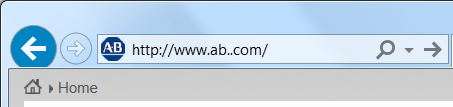
Step 1: Point your web browser to “www.ab.com”
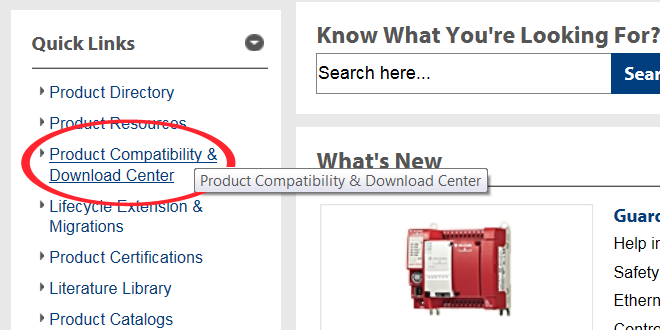
Step 2: In the “Quick links” menu on the left, click on the “Product Compatibility and Download Center” link
Step 3: Now click on “Available Versions” located in the center of the “Product Compatibility and Download Center” page.

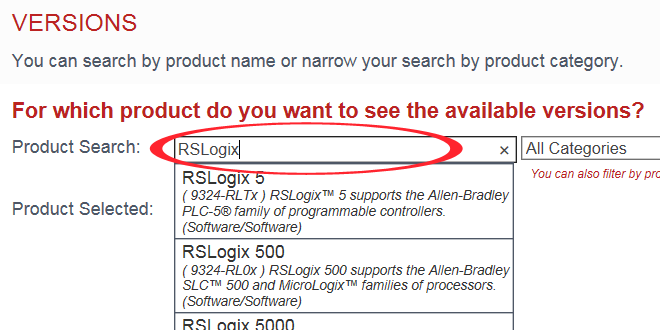
Step 4: Next, type in the name (or part number) of the software into the “Product Search” field, and then select the product from the results below.
Note: In the below example I entered “RSLogix” into the search field, and then selected RSLogix 5000 to continue.
Step 5: On the results screen, click the minus sign next to “Rockwell Services,” then click the plus sign next to “Operating Systems.”
Now select the plus sign next to the operating system you’re interested in.
Note: In the below example, I chose “Windows 7”
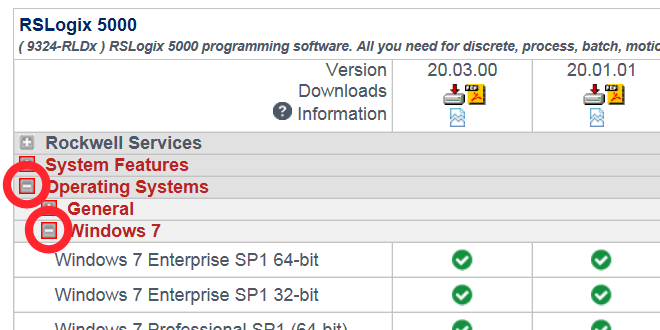
Step 6: For each combination of Rockwell Software and Microsoft Windows there will be a compatibility icon, and those icons are described in the icon legend at the bottom of the page.
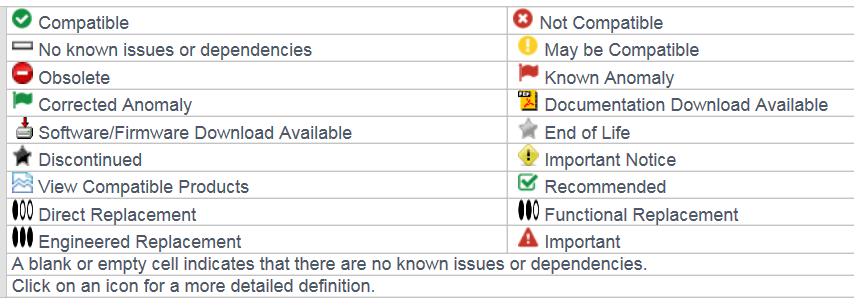
Note: In my example, RSLogix version 20.03 and 20.01 are both shown with the green “compatible” icon for Windows 7 SP1.
I hope the above step-by-step procedure on how to look up Rockwell Software compatibility with Microsoft Windows operating systems was helpful.
If you have a comment, question, or suggestion, please feel free to submit them using the “post a comment or question” link below.
Until next time, Peace ✌️
If you enjoyed this content, please give it a Like, and consider Sharing a link to it as that is the best way for us to grow our audience, which in turn allows us to produce more content 🙂
Shawn M Tierney
Technology Enthusiast & Content Creator
Support our work and gain access to hundreds members only articles and videos by becoming a member at The Automation Blog or on YouTube. You’ll also find all of my affordable PLC, HMI, and SCADA courses at TheAutomationSchool.com.

- PRONETIQS: Measure, Monitor, and Maintain (P257) - January 14, 2026
- FactoryTalk Design Workbench First Look, CCW Comparison - December 19, 2025
- Drew Allen of Grace Technologies on Automation, Safety, and More (P256) - December 17, 2025
Discover more from The Automation Blog
Subscribe to get the latest posts sent to your email.